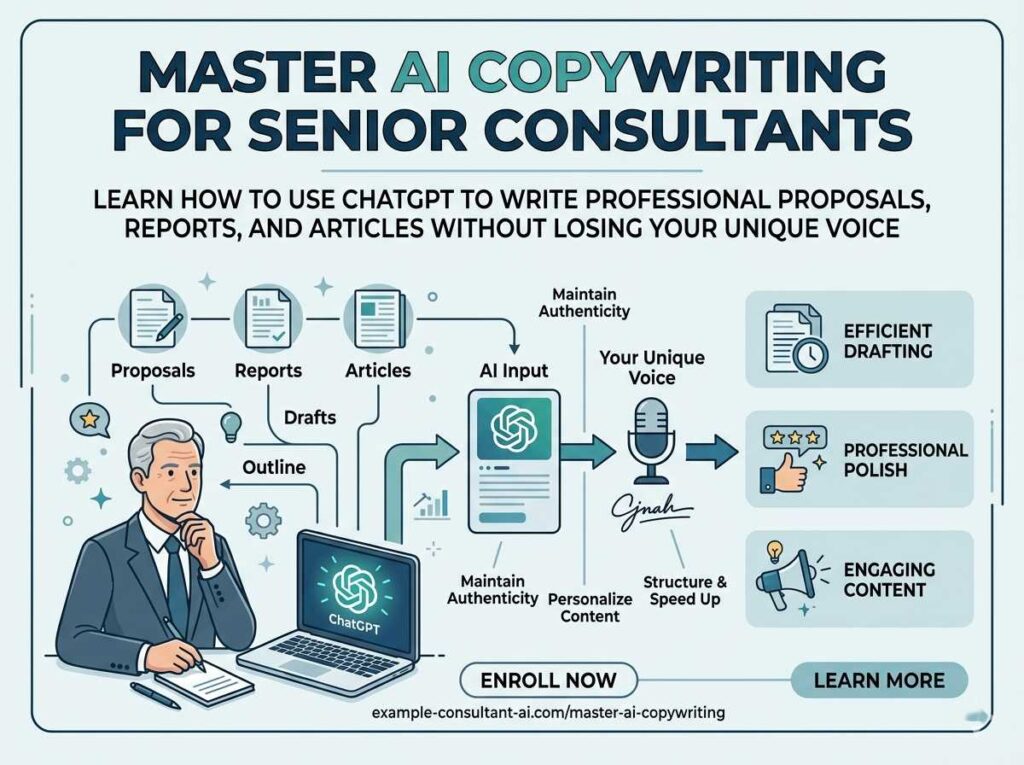
If you have spent thirty or forty years building deep expertise in your field, the last thing you want to do is spend hours staring at a blank screen trying to write a LinkedIn post or a client proposal. Yet here you are — and you are not alone. AI copywriting for senior consultants is the practical solution that thousands of experienced professionals over 55 are using right now to market themselves, win new clients, and stay professionally relevant without burning out on writing tasks.
This guide explains exactly what AI copywriting is, why it works so well for people with real-world expertise, and how to start today — even if you have never touched an AI tool in your life. No technical background required. No credit card needed to get started.
What Is AI Copywriting? (Plain-English Answer)
AI copywriting means using an artificial intelligence program — like ChatGPT or Claude — to help you write professional text. You type a plain-English instruction (called a “prompt”), and the AI returns a polished draft in about 10 seconds. You read it, adjust it to match your voice, and use it. Think of it as having a very fast assistant who types while you think — one that you direct entirely with your own expertise.
Why AI Copywriting Works Especially Well for Senior Consultants

Here is something the tech world rarely admits: AI writing tools are actually better suited to experienced professionals than to young beginners. The reason is simple. The AI provides speed and structure. You provide the depth, the real-world stories, and the judgment. That combination is nearly impossible to beat.
A 28-year-old marketing manager using AI produces generic output because they have limited real experience to layer on top. You, as a seasoned consultant, can add three decades of nuanced insight on top of the AI’s draft. The result reads as authoritative, specific, and trustworthy — exactly what clients want before they write a check.
The Visibility Problem Nobody Warns Consultants About
In 2026, most B2B clients find their consultants online before ever making a phone call. If you are not showing up on LinkedIn, in Google searches, or in email inboxes regularly, you are essentially invisible — no matter how good your work actually is. The consultants winning contracts today are posting helpful, specific content consistently. AI makes “consistently” achievable without it becoming a second full-time job.
Consider the simple math: writing one LinkedIn post from scratch typically takes 60 to 90 minutes. With an AI tool handling the first draft, that same post takes about 15 minutes total. That means you can post four times a week in the same time it used to take you to post once. Visibility compounds over time, and greater visibility means more inbound leads. You can explore this connection further in our guide to personal brand monetization for seniors.
AI Copywriting vs. Traditional Writing: A Side-by-Side Look
| Task | Writing From Scratch | AI-Assisted Writing |
|---|---|---|
| One LinkedIn post | 60–90 minutes | 10–15 minutes |
| Client proposal (full draft) | 4–8 hours | 30–60 minutes |
| Monthly email newsletter | 3–5 hours | 45–90 minutes |
| Website bio rewrite | 2–3 hours | 20 minutes |
| Cold outreach email | 45–60 minutes | 10 minutes |
| Who provides the expertise | You | You — AI only formats it |
| Cost to start | Just your time | Free (basic tools) |
The 3 Best AI Writing Tools for Senior Consultants (All Free to Start)
You do not need to spend a dollar to get results. Every tool below has a free version that handles most consulting tasks well. Here is an honest breakdown of each one.
| Tool | Best For | Free Plan? | Beginner-Friendly? |
|---|---|---|---|
| ChatGPT (OpenAI) | Short posts, emails, proposals, live web research | Yes — GPT-4o mini | Very easy ⭐⭐⭐⭐⭐ |
| Claude (Anthropic) | Long documents, nuanced tone, reading contracts | Yes — generous free limit | Cleanest interface ⭐⭐⭐⭐⭐ |
| Gemini (Google) | Google Docs integration, Gmail drafting | Yes — free with Google account | Great if you use Google ⭐⭐⭐⭐ |
For a detailed comparison between the two most popular options, read our ChatGPT vs. Claude for seniors guide, written specifically for people over 55 with no technical background.
Privacy Rule — Always Follow This: Never paste real client names, confidential business data, financial figures, or proprietary processes into any AI tool. Use placeholders like [Client Name] or [Industry] instead, and fill in the real details after the AI finishes drafting. Your clients’ confidentiality is your professional responsibility.
How to Use AI Copywriting for Senior Consultants: A Full Step-by-Step Walkthrough
This walkthrough assumes you have never used an AI tool before today. By the end of step seven, you will have a real draft you can actually use.
- Open your browser and go to chatgpt.com or claude.ai.
Click “Sign up” and create a free account with your email address. This takes about 3 minutes. No credit card is required for the free version of either tool.
- Identify one real problem your clients face.
Write it in one or two plain sentences — do not worry about making it sound professional yet. Example: “My clients in retail often lose good staff because their managers don’t give enough honest feedback.” This becomes the seed of your draft.
- Tell the AI who you are before you ask for anything.
This single step dramatically improves quality. One sentence of context — your field, your years of experience, and who your audience is — gives the AI enough direction to write in a relevant tone.
- Type your full prompt and press Enter.
The AI responds in 5 to 15 seconds. Read the entire draft before making any changes.
- Read the draft out loud.
Your ear catches unnatural language faster than your eye does. Any sentence that sounds like something you would never say in a client meeting should be flagged for replacement.
- Add one specific detail the AI could not know.
A brief story from a past client engagement (anonymized), a specific statistic from your own career, or a lesson you learned the hard way. This one addition is what separates your content from everything else in someone’s feed.
- Copy the final version and post or send it.
The whole process should take 12 to 18 minutes from start to finish once you have done it a few times.
Video Guide: How to Scale Your Expertise with AI Copywriting
Before moving into the specific prompts, watch this deep dive into how AI tools are reshaping the consulting and marketing landscape. In this video, Emily Reagan and “The Laurens” discuss how to avoid the “generic AI sound” and use custom GPTs to maintain your authentic voice while working faster.
Key takeaways from the video:
- Custom AI Assistants: Why training a mini-assistant on your specific brand voice is superior to basic prompts.
- The Step-by-Step Approach: Why you should ask for an outline first before letting the AI write a full document.
- Adding Specificity: How to use your unique stories and case studies to eliminate “word salad” and make your messaging pop.
Ready-to-Use AI Prompts Designed for Consulting Work
The single biggest factor in AI output quality is the quality of your instructions. These four prompts are ready to copy. Replace the text in [brackets] with your own details.
Prompt 1 — Weekly LinkedIn Post
You are helping a senior consultant write a LinkedIn post.
I have [X] years of experience in [your field — e.g., human resources / supply chain / financial planning].
Topic: [Paste your idea here — one sentence is enough]
Write a 180-word LinkedIn post on this topic. Tone: Professional but warm. No corporate buzzwords. End with one open-ended question that invites readers to share their experience. Do not use the words: “unleash,” “delve,” “game-changer,” or “dive deep.”
Prompt 2 — Client Proposal Introduction
I need help with the opening section of a consulting proposal.
About me: [Your name], [your title], [X] years helping [type of client] with [core problem you solve].
About the client: [Brief description — industry, company size, main challenge they are facing]
Write a 150-word introduction that:
– Opens with the client’s problem, not my credentials – Mentions my experience naturally in the second paragraph
– Closes with a confident but not pushy transition into my proposed solution
– Tone: clear, confident, and respectful
Prompt 3 — Monthly Email Newsletter
Write a short professional email newsletter for my consulting practice.
My audience: [Type of executives or business owners I serve]
Topic this month: [One trend, tip, or lesson — in one sentence]
My personal take: [What I actually think about this — 1 to 2 sentences in plain language]
Include: A brief “What This Means for You” section at the end.
Word count: 250 to 300 words total.
Tone: Collegial and informative — like a trusted colleague sharing a useful insight, not a sales pitch.
Prompt 4 — Cold Outreach Email
Write a short, direct outreach email for a potential consulting client.
About me: [X] years in [your field]. I help [type of company] with [core problem you solve].
About them: [1 to 2 sentences about what you know of their company or industry]
My offer: A free 20-minute call to explore if I can help. Rules:
– Maximum three short paragraphs
– No generic compliments or flattery
– Do NOT use the phrase “I hope this email finds you well”
– End with one clear yes/no question
– Tone: direct, respectful, confident
5 High-Value AI Copywriting Use Cases for Senior Consultants
1. Building Authority on LinkedIn
LinkedIn is where most B2B consulting clients look before they pick up the phone. A consultant who posts two or three thoughtful, specific observations every week builds credibility that paid advertising cannot replicate. The challenge has always been time. With AI handling the first draft, consistent posting becomes a realistic weekly habit. If you are new to building a consulting presence online, our consulting niche guide for seniors explains how to position yourself clearly before you start posting.
2. Turning Around Proposals the Same Day
Many senior consultants lose deals not because of their price or experience, but because their proposal takes too long to arrive. By the time a 10-page document is drafted and polished, the client has already spoken to two other consultants. AI cuts proposal drafting from days to hours. You still review every word — the AI simply eliminates the “staring at the blank screen” phase that consumes most of that time.
3. Keeping Past Clients Warm
Past clients are your most reliable source of repeat business and referrals. A short, genuinely useful monthly email keeps you top of mind without feeling like you are constantly selling. AI makes it easy to write that email in a voice that sounds personal rather than automated. For consultants who are transitioning out of corporate roles, this kind of warm nurturing is covered in our corporate-to-consulting transition guide.
4. Rewriting Your Website Bio and Services Page
Many experienced consultants have a bio that reads like a resume or undersells decades of genuine impact. AI is unusually good at taking a bullet-point list of your accomplishments and transforming it into a compelling narrative that speaks directly to a client’s needs — not just to your own history. Give the AI your raw bullets and ask it to write a third-person bio that leads with the problem you solve.
5. Drafting Case Studies and Testimonial Requests
Case studies convert website visitors into paying clients better than almost any other type of content. They are also the content that most consultants never find time to write. AI can structure a case study from your rough notes in under 20 minutes. You can also use it to write a warm, professional email asking a satisfied client for a written testimonial — a conversation many people find awkward to initiate on their own.
5 Mistakes Senior Consultants Make With AI Writing (And the Fix for Each)
| Mistake | Why It Damages Your Credibility | The Fix |
|---|---|---|
| Publishing the first draft without editing | Reads like every other AI post — generic and forgettable | Always add one personal story or one specific data point from your own experience |
| Using vague, one-sentence prompts | Vague input produces vague, useless output | Use the detailed prompt templates from this guide — context is everything |
| Trusting AI statistics without checking them | AI can invent numbers convincingly — called “hallucination” | Verify any stat before publishing. BLS.gov and Pew Research are reliable free sources |
| Keeping AI-typical phrases in the final draft | Experienced readers spot words like “delve,” “unleash,” or “dive deep” immediately — it erodes trust | Read the draft aloud and delete any word you would not say in a client meeting |
| Pasting confidential client data into AI tools | Potential privacy violation and breach of professional trust | Use placeholder text — [Client Name], [Revenue Figure] — and fill in real details yourself after the draft is done |
Realistic Results: What to Expect in the First 90 Days
What Senior Consultants Typically Experience
- Time saved weekly: 5 to 8 hours of writing and drafting eliminated
- Proposal speed: Turnaround drops from multiple days to same-day delivery
- Posting frequency on LinkedIn: Most consultants go from once a month to two or three times per week
- Additional discovery calls: Typically 1 to 2 more per month from improved visibility
- Client perception: You appear more active, more current, and more in demand
- Tool cost: Zero to start; $20/month for premium features if and when you need them
What AI will not do: It lacks the ability to replace your judgment on a client problem, build genuine relationships, or walk into a boardroom to present findings. Rather than a substitute for the expertise you have spent a career accumulating, it remains a production tool — excellent at output volume and speed.
A Real Story: How One Retired CFO Built a Practice With AI Writing
Margaret spent 34 years as a CFO in the healthcare sector before stepping back in late 2023. She knew more about hospital billing systems and Medicare reimbursement nuances than almost anyone in her region. But when she launched her consulting practice, she hit an immediate wall: nobody knew she existed.
A former colleague suggested AI writing tools. Margaret was skeptical. Having spent her career crafting precise financial language, she felt no interest in letting a computer speak for her.
She started with a single experiment. She recorded a 4-minute voice note explaining a Medicare billing error she had watched hospitals repeat for twenty years. A free transcription app turned that recording into text. She pasted the text into Claude with one instruction: “Turn this into a LinkedIn post that reads like an experienced CFO speaking directly to hospital administrators. Keep my language — just make it tighter and more readable.”
The post received 47 comments and 12 new connection requests from hospital administrators within three days. Two of those administrators became paying clients within 60 days.
“The AI did not give me the ideas,” she said afterward. “I gave the AI everything that mattered. It just organized my thoughts more clearly than I had time to do myself.”
Your 30-Minute Action Plan: Start Today, Not Next Week
- Minutes 1–5: Create your free account at chatgpt.com or claude.ai. Use your existing email. No payment information required for the free plan.
- Minutes 5–10: Write down three topics you genuinely know more about than most people. Just bullet points — one line each is enough. These become your first three posts.
- Minutes 10–20: Copy Prompt 1 from this guide. Fill in your industry and your first topic. Paste the full prompt into the AI and press Enter. Read the entire response before doing anything else.
- Minutes 20–28: Read the draft out loud. Replace two or three phrases that don’t sound like you. Add one specific detail from your own career experience.
- Minutes 28–30: Post the final version on LinkedIn, or save it as a draft and commit to posting it within the next 48 hours. Momentum matters more than perfection on the first try.
Building Your Consulting Practice From Scratch?
If you are converting from a corporate career into consulting, our corporate-to-consulting guide for seniors covers positioning, pricing, and finding your first clients — with AI tools built into every step of the workflow.

Frequently Asked Questions About AI Copywriting for Senior Consultants
No. Consultants have always used templates, editors, ghostwriters, and word processors to communicate more efficiently. AI is simply the newest version of that kind of assistance. Every idea, judgment call, and piece of expertise in your content is still entirely yours. The AI drafts faster — you decide what is true, what is useful, and what is worth saying. Clients hire you for what you know, not for how fast you type.
None at all. If you can type a text message or compose an email, you have every skill you need. Both tools open to a simple text box in your browser. You type your instructions in plain English, press Enter, and read the result. There is no installation, no coding, and no special knowledge required. Most people over 55 who try these tools for the first time say they wish they had started sooner.
Only if you publish the first draft without any editing. The difference between AI-sounding content and authentic human content comes down to two things: personal specificity and natural language. When you add one real anecdote from your career and replace any phrase you would not actually say out loud, the result reads like you — not a machine. Editing an AI draft is far faster than writing from a blank page.
Zero to start. Both ChatGPT and Claude offer free plans that are fully capable for most consulting tasks — proposals, LinkedIn posts, outreach emails, and newsletters. The paid plans (approximately $20 per month each) add features like document uploading, unlimited usage, and real-time web search. Most senior consultants find the free versions more than sufficient for months before considering an upgrade.
Yes, in practical ways. For instance, AI helps identify which industries are most likely to need your specific expertise right now. Beyond research, it can draft personalized outreach messages or help you investigate a company before a discovery call. This ensures you arrive with specific, relevant observations — which increases your close rate significantly compared to generic introductory calls.
Simply tell the AI to adjust it. After reading the first draft, type: “Make this warmer and less corporate” or “Tighten this — it is too casual for a formal proposal.” The AI rewrites immediately. This back-and-forth refinement is a normal part of the process and adds only a few minutes to the total time. The ability to adjust tone on demand is one of the most practical advantages AI has over writing from scratch.
Major platforms like OpenAI and Anthropic use strong encryption and publish detailed privacy policies. That said, the professional standard for any consultant is straightforward: never paste real client names, contract details, financial data, or proprietary business information into any AI tool. Use placeholder text and fill in sensitive specifics yourself after the draft is complete. This protects your clients and your professional reputation.
The Bottom Line on AI Copywriting for Senior Consultants
The consultants who will thrive over the next five years are not the ones who type fastest or know the most about technology. They are the ones who stay visible, communicate their value clearly, and show up in their clients’ professional lives consistently. AI copywriting for senior consultants is the most efficient tool available right now for achieving exactly that — without sacrificing the authenticity that decades of real experience provides.
Your expertise is the rarest thing in any room you walk into. AI is simply there to make sure more of the right people hear about it, more often, with less effort from you.
Open an AI tool today. Copy Prompt 1 from this guide. Read the draft. Edit it until it sounds like you. Post it. That single action, repeated two or three times per week, is what separates the consultants who get inbound calls from the ones who wait.
For a broader look at how AI tools support your entire consulting business — from client acquisition to daily research — explore our complete guide to the best AI tools for seniors in 2026.
Last reviewed and updated: May 1, 2026 by the SeniorGig Team.