Building a personal website for seniors is no longer a technical hurdle; it is the most effective way to turn decades of experience into a modern consulting career.
Before: A retired marketing executive with 31 years of experience, three industry awards, and a LinkedIn profile nobody visits. After: A clean, five-page website that took one Saturday to build. Three consulting inquiries in the first month. One signed client at $4,500.
The difference between these two versions of the same person wasn’t talent, connections, or luck. It was a URL.

Victor spent 31 years building brand strategies for consumer goods companies across the Midwest. After retiring at 63, he reconsidered six months later and decided to offer marketing consulting to mid-size companies that couldn’t afford a full-time CMO. Updating his LinkedIn profile was the first step, followed by reaching out to his professional network. Then, he waited.
Nothing happened.
A younger colleague suggested the problem: “When someone Googles your name, what do they find?” Victor searched himself. A LinkedIn profile. An old company bio. A conference speaker listing from 2019. Nothing that said: this person is available, here’s what they do, here’s how to reach them.
“I had no home base,” Victor says. “No place that was mine and said what I was offering. LinkedIn is rented space. A website is your own front door.”
He built his website on a Sunday afternoon. By the following Friday, a former colleague had forwarded it to a CEO who needed exactly what Victor offered. That CEO became his first client.
This guide shows you how to build that front door — completely, practically, and faster than you think.
🤔 Do Seniors Really Need a Personal Website in 2026?
The honest answer depends entirely on what you’re trying to accomplish. Let’s be specific:
✅ You DO Need a Website If…
- You’re building or running a consulting practice
- You want to be found by potential clients who Google you
- You’re selling courses, digital products, or services
- You’re seeking board positions or speaking engagements
- You want to publish content that builds authority over time
- You’re applying for senior remote positions where credibility matters
⚡ LinkedIn Alone May Suffice If…
- You’re seeking traditional employment (not consulting)
- All your client acquisition happens through direct referrals
- You have zero interest in digital content creation
- Your professional network is so strong that Google search is irrelevant
For most seniors building any form of independent professional practice in 2026 — consulting, coaching, freelancing, course creation, or digital product sales — a personal website is not optional. It’s the difference between having a professional identity online and not having one.
Think of it this way: your LinkedIn profile is your presence on someone else’s platform, subject to their rules, their algorithm, and their design decisions. Your personal website is property you own. It says exactly what you want it to say, looks exactly how you want it to look, and exists as long as you choose to pay the $23/month to keep it running.
🌐 Personal Website vs. Consulting Website: Understanding the Difference
Before building anything, it’s worth clarifying an important distinction — because seniors often confuse these two concepts and end up building the wrong thing.
A consulting website is a business website. Its primary purpose is to explain your consulting services, establish your credentials, and convert visitors into client inquiries. It’s service-focused and relatively static.
A personal portfolio website is broader. It showcases your professional identity across multiple dimensions — your work history, your expertise, your writing, your speaking, your projects, your values. It’s person-focused and often includes a blog or content section that grows over time.
For most senior professionals, the ideal is a hybrid: a personal portfolio site that includes clear consulting or service offerings. You want the site to do two things simultaneously — tell the story of who you are professionally AND make it clear what you’re currently offering and how to engage you.
If you’ve already built a dedicated consulting website, our guide on How to Set Up a Consulting Website for Seniors covers that specific use case in full. This guide covers the broader personal portfolio — the site that represents you as a professional across all your current activities.
📐 What Your Personal Portfolio Website Actually Needs
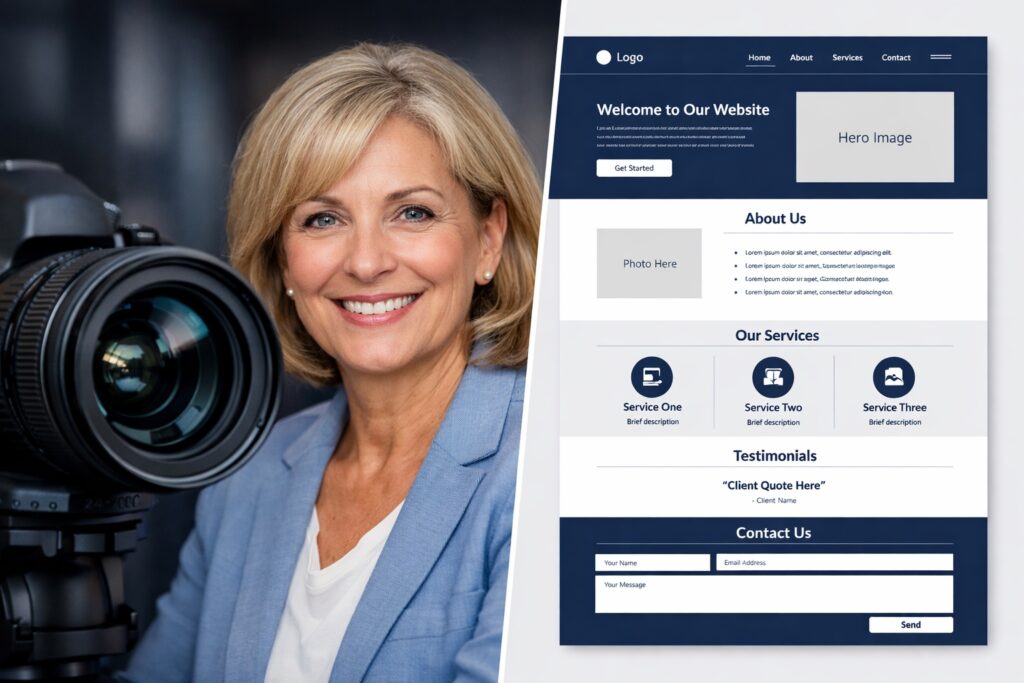
Most seniors dramatically overthink this. The sites that work are simple. Here’s the complete architecture of an effective senior professional portfolio site:
Page 1: Home — Your Professional Identity in 30 Seconds
A visitor lands on your homepage and has approximately 8 seconds before they decide to stay or leave. Your homepage needs to answer three questions in that window:
- Who are you? (Name, professional headline, credibility signal)
- What do you do? (Current offerings — consulting, speaking, writing, etc.)
- What should I do next? (One clear call to action)
Your homepage is not your autobiography. It’s a first impression that invites someone to learn more. Save the details for interior pages.
Page 2: About — Your Story, Your Credibility, Your Values
This is where you tell your professional story in a way that’s relevant to your current goals; remember that the About page is often the most visited part of a personal website for seniors. Not a resume — a narrative. Write in first person. Include:
- Your career arc in 2–3 paragraphs (emphasizing relevance to your current work)
- Specific accomplishments with numbers wherever possible
- Why you do what you do now (the authentic reason, not a polished marketing statement)
- A professional photo — warm, approachable, current
- Any credentials, publications, or recognitions worth noting
Page 3: Work / Portfolio — Proof You Deliver
This page shows evidence of your expertise, serving as the visual proof on your personal website for seniors that you can deliver results. What it contains depends on your professional focus:
For consultants and coaches: Case studies (anonymized if necessary) describing client situations, your approach, and measurable outcomes. Even two or three strong case studies are more compelling than a list of past employers.
For writers and content creators: Links to published articles, sample posts, or excerpts from your best work. If you have a Substack newsletter, link to your best issues.
For course creators and educators: Screenshots of your course platform, student testimonials, and sample lesson content. Link to your Teachable or Gumroad page.
For speakers and executives: Speaking topics, past engagements (with logos of organizations if recognizable), and a short speaking sample video if available.
Page 4: Services or Current Offerings
Clear, specific descriptions of what you currently offer and how to engage you. This is where you explain your consulting packages, coaching programs, speaking topics, or whatever services your professional identity is built around. Include pricing if you’re comfortable — it pre-qualifies visitors and reduces back-and-forth. For pricing guidance specific to consulting, see our How to Price Your Consulting Services guide.
Page 5: Contact — Remove Every Barrier
A contact form with three fields maximum (name, email, message). Your email address written out. A link to your calendar scheduling tool. Your LinkedIn URL. Response time expectation (“I respond within one business day”).
The contact page has one job: make it as easy as possible for the right person to reach you. Every additional field, question, or friction point reduces the number of inquiries you receive.
Optional: Blog / Insights Section
A blog is not required at launch — but it’s the element that provides the most long-term value. A consistent blog builds Google search presence over time, demonstrates your thinking, and gives you content to share on LinkedIn and other channels. If you start one, commit to at least one post per month. Inconsistency is worse than no blog at all.
🛠️ Choosing Your Platform: The Three Realistic Options for Seniors
There are dozens of website building platforms. Three are genuinely worth considering for senior professionals building their first personal website in 2026:
| Platform | Monthly Cost | Ease for Seniors | Best For |
|---|---|---|---|
| Squarespace | $23–$33/mo | ⭐⭐⭐⭐⭐ Easiest | Seniors who want beautiful results quickly, no design decisions |
| WordPress.com | $9–$25/mo | ⭐⭐⭐⭐ Moderate | Seniors who want a blog or plan to grow their site significantly |
| Wix | $17–$29/mo | ⭐⭐⭐⭐ Flexible | Seniors who want maximum design control and enjoy experimenting |
💡 Honest recommendation for most seniors: Start with Squarespace. The templates are professionally designed, the interface requires no technical knowledge, and most seniors report being live with a complete site within 4–8 hours of first login. Visit squarespace.com for a free 14-day trial with no credit card required.
🔑 Your Domain Name: The Address That Defines Your Brand
Your domain name is your website’s address — what people type to find you. For a personal portfolio site, the decision is straightforward:
The Best Domain Name Formula for Senior Professionals
Option 1: YourFullName.com — The gold standard for personal portfolio sites. Victor’s site is victorholloway.com. Simple, professional, and immediately associated with you personally. If your name is common and the .com is taken, try adding your middle initial or your specialty: victorjholloway.com or victorhollowaycmo.com.
Option 2: YourNameConsulting.com or YourNameStrategies.com — Slightly more business-focused. Better if you anticipate eventually building a team or brand beyond yourself. hollowaymkt.com or hollowaystrategic.com are examples.
Option 3: A descriptive specialty domain — Works when your specialty is highly searchable: operationsconsultantchicago.com or hrconsultantfortune500.com. Less personal but potentially better for Google search discovery in your niche.
Domain registration costs $12–$20 per year. Most website platforms let you purchase and connect a domain directly during setup — no separate registrar required. Always choose .com over .net, .biz, or other extensions when possible. Availability can be checked instantly on any platform’s domain search tool.
📸 The One Element That Makes or Breaks Senior Portfolio Sites
There’s a single element that separates professional personal website for seniors projects from amateur ones — and it’s not design, not content, and not technology.
It’s the photograph.
Your professional headshot is the most important visual element on your personal website. It appears on your homepage and About page. It’s the first human signal visitors receive about who you are. And for senior professionals specifically, it communicates something uniquely powerful: the calm confidence of someone who has been through things, made decisions, and arrived at this point in their career with something to offer.
That’s not something a 28-year-old stock photo model conveys. A genuine, well-taken photo of you — at 62 or 67 or 71 — communicates authority that youth simply can’t replicate.
What Makes a Good Professional Headshot for Seniors
- Natural light: Sit near a window facing the light source. Avoid light behind you (creates silhouette) and harsh overhead light (creates shadows)
- Simple background: A plain wall, a blurred outdoor background, or a tidy bookshelf. Nothing that competes with your face
- Genuine expression: A relaxed, genuine smile — not forced. Photos taken mid-conversation or mid-laugh often work better than posed shots
- Professional but approachable clothing: What you’d wear to meet a client for the first time
- Recent: Within the last two years. A photo from 2015 that no longer looks like you undermines trust
A professional photographer produces the best results ($150–$350 for a headshot session) but a well-taken smartphone photo in good natural light is entirely adequate for most senior portfolio sites. Take 20 to 30 shots, and choose the one that looks most like you at your most confident and natural.
✍️ Writing Your Website Content: The Senior’s Advantage
The most time-consuming part of building a personal website is writing the content — the About page, the Services page, the bio, the case studies. Many seniors stall here, not because they lack material but because translating decades of professional experience into clear, compelling web copy feels difficult.
Here’s the mindset shift that makes it easier: write the way you talk to a respected colleague, not the way you write a performance review. Conversational, specific, and honest. The goal is not to impress — it’s to inform and build trust.
Using AI to Draft Your Website Content
Claude and ChatGPT can dramatically speed up the writing process. The most effective approach:
- Write a brain dump of your professional background, key accomplishments, and what you currently offer — in bullet points, rough sentences, however it comes out
- Paste it into Claude with the instruction: “Using these notes, write an About page for a personal portfolio website for a [your role] with [X years] of experience. Tone should be professional but warm, first person, 300–400 words.”
- Read the draft aloud. Does it sound like you? Edit every sentence that doesn’t. Add specific examples only you would have.
- Repeat for each page
The AI provides structure and prose; you provide the substance and authenticity. For the full AI toolkit that supports content creation for senior professionals, see our Best AI Tools for Seniors guide.
🚀 The Complete Launch Checklist: Before You Hit Publish
Content
- ☐ Homepage headline clearly states who you help and how
- ☐ Professional photo present on homepage and About page
- ☐ About page written in first person, 300–500 words
- ☐ Services or offerings page with specific descriptions
- ☐ At least one case study, testimonial, or work sample on portfolio page
- ☐ Contact form tested and working (send yourself a test message)
- ☐ All pages proofread (read aloud — catches errors your eyes miss)
Technical
- ☐ Custom domain connected (not platform.squarespace.com)
- ☐ Site loads on mobile phone correctly (view on your phone before publishing)
- ☐ All links click correctly and go where intended
- ☐ No broken images or missing photos
- ☐ Privacy Policy page present (required for GDPR compliance and AdSense eligibility)
- ☐ No paid plan with platform branding visible in footer
Post-Launch (First Week)
- ☐ URL added to LinkedIn profile Contact section
- ☐ URL added to email signature
- ☐ Create a LinkedIn post announcing your new personal website for seniors — a simple sentence like “I just launched my professional website” with the link is enough to start driving traffic.
- ☐ Google Search Console account created and site submitted for indexing
- ☐ URL shared with 5–10 close professional contacts for feedback
📊 What Your Personal Website Can Do That LinkedIn Cannot
Some seniors ask whether a personal website is redundant given a strong LinkedIn profile. Here’s why they’re complementary rather than competing:
| Capability | Personal Website | |
|---|---|---|
| Google search visibility | Limited | ✅ Full control |
| Design and branding control | None | ✅ Complete |
| Long-form content (blog) | Partial (articles) | ✅ Unlimited |
| Direct product/service sales | ❌ No | ✅ Yes |
| Portfolio case studies | Limited | ✅ Comprehensive |
| Email list building | ❌ No | ✅ Yes |
| Ownership — platform can’t delete you | ❌ No | ✅ Yes |
| Built-in professional network | ✅ Yes | ❌ Must build |
The ideal is both working together: LinkedIn provides network reach and discovery within a professional community; your personal website provides the depth, control, and Google visibility that LinkedIn cannot. For optimizing the LinkedIn side of this equation, see our guides on LinkedIn Profile Tips for Professionals 50+ and LinkedIn Outreach for Seniors.
🔗 Connecting Your Website to Your Full Professional Ecosystem
A personal website works best as the hub of a broader professional presence — not a standalone island. Here’s how to connect it to everything else you’re building:
Social Media and Newsletter Integration
- LinkedIn profile → Website: Add your URL to your LinkedIn Contact section. Every LinkedIn post can reference your website for deeper reading. See LinkedIn Outreach for Seniors for how to drive traffic from LinkedIn to your site.
- Website → Email newsletter: Add an email signup form to your website. Visitors who subscribe become your most engaged audience. Connect to a Substack or newsletter platform — see Substack for Seniors.
Monetization and Client Acquisition
- Website → Digital products: Link your Gumroad or Teachable products from your website’s services page. Your site drives traffic; the platform handles the transaction. See our guides on Gumroad for Seniors and Teachable for Seniors.
- Website → Consulting inquiries: Your contact page and services page work together to convert visitors into consulting clients. See How to Start Consulting After 50 for the full client acquisition process.
- Website → Affiliate income: Blog posts on your website can include affiliate links that earn commissions passively. See our Affiliate Marketing for Seniors guide for how this works.
The Result: A Professional Identity You Control
Victor’s website now serves as the center of everything: it lists his consulting services, links to a 12-page PDF guide he sells on Gumroad for $19, features his monthly email newsletter signup, and hosts four case studies from his first year of client work. Each piece connects to and reinforces the others.
“The website is the hub,” he says now. “Everything else spins off of it. Without it, I’d have LinkedIn and hope. With it, I have a professional identity that I own and control”.
For the complete picture of online income and professional presence after 50, visit our Make Money Online After 50 Master Guide. Your front door is waiting to be built. One weekend. Five pages. One domain name. That’s the entire investment between where you are now and a professional online identity that works for you while you sleep.
❓ Frequently Asked Questions: Personal Website for Seniors
Most seniors finish a five-page site in 6–10 hours. If your content is ready, technical setup takes only 2–3 hours.
Total cost is roughly $300 per year for hosting and a domain. This is a tax-deductible business expense.
You need five core pages: Home, About, Portfolio, Services, and Contact.
They work best together; LinkedIn provides the network, while your website provides Google visibility and total ownership.
Share your URL on LinkedIn, use direct email referrals, and build organic Google search presence over time.
No. You are not required to list graduation years or birth dates. Focus on your expertise instead.