

Earn money with AI transcription is one of the most realistic, low-stress ways for people over 55 to bring in extra income from home — no commute, no boss, and no need to learn complicated technology. If you can listen to a recording and fix a few typos, you already have the core skill this work requires. This guide walks you through every step, in plain everyday language, so you can go from total beginner to earning your first paycheck online.
Whether you’re fully retired, semi-retired, or simply looking for something meaningful to do between 9 and noon, AI transcription fits around your life — not the other way around.
What Is AI Transcription? (Plain English Explanation)

Let’s start from scratch, because most guides skip this part and assume you already know things you don’t.
Transcription simply means turning spoken words into written text. Imagine someone records a 10-minute podcast interview. A transcriptionist listens to that recording and types out everything that was said — word for word — so someone can read it later.
AI transcription means a computer program (artificial intelligence) does that listening and typing automatically. Tools like Otter.ai or Descript can listen to an audio file and produce a written transcript in about 2–3 minutes.
Here is the catch: AI makes mistakes. It mishears words, gets names wrong, and produces run-on sentences without proper punctuation. The transcript looks like a rough first draft — useful, but not ready to publish.
That is where you come in. Your job is not to type the whole thing from scratch. Your job is to read what the AI wrote, listen to the original audio, and fix the errors. Think of it as being a proofreader — but for audio content.
💡 Simple Analogy
Think of it like this: AI is the student who writes a rough draft of an essay. You are the teacher who reads it, corrects the mistakes, and makes it ready to turn in. The student does most of the work — you bring the judgment and the polish.
Why AI Transcription Works Especially Well for People Over 55
Not every online job is a good fit for seniors. Many require fast typing, video calls with strangers, or learning complex software. AI transcription is different for several reasons:
| What Most Online Jobs Require | What AI Transcription Requires |
|---|---|
| Fast typing (60+ words per minute) | Basic typing — speed doesn’t matter much |
| Video calls and on-camera presence | Zero video calls — 100% text-based |
| Learning new software constantly | Two beginner-friendly tools, used daily |
| Set schedule, fixed hours | Work whenever you want — fully flexible |
| Loud, fast-paced environment | Quiet, calm, solo work from home |
| Years of tech experience required | No prior experience needed |
There is also something worth saying that most guides won’t: the skills you’ve built over a lifetime — paying attention to detail, listening carefully, understanding context — are exactly what makes a great transcript editor. Those are not small things. They are the job.
A Real Story: How Margaret, 63, Earned Her First $400
Margaret spent 28 years as an administrative assistant at a school district in Ohio. When she retired, she missed having a structured task to complete each day — and her Social Security check left little room for extras.
Her daughter suggested transcription. Margaret was skeptical: “I thought I needed to be a tech person for that.”
She wasn’t. Here is what she actually did in her first month:
- Watched two YouTube videos about Otter.ai (about 20 minutes total)
- Uploaded a free sample audio file from YouTube to practice
- Created a simple Fiverr profile describing herself as an “AI transcript editor”
- Charged $15 for her first job — a 10-minute podcast episode
- Completed it in about 40 minutes
By week four, she had 11 reviews on Fiverr and raised her rate to $25 per transcript. That month she earned $412. She works about 90 minutes a day, five days a week, and describes it as “the most relaxed job I’ve ever had.”
Margaret’s story is not unusual. The pattern repeats: a slow first week, growing confidence in week two, first repeat clients by week three.
The Only Tools You Actually Need (Both Free to Start)
You do not need to spend money to get started. Here are the two tools that work best for beginners:
🎙️ Otter.ai
Best for: Beginners. Very simple interface. Paste a YouTube link or upload an audio file and it gives you a transcript in minutes.
- Free plan: 300 minutes/month
- Works in any web browser
- No download required
✂️ Descript
Best for: When clients send video files. Descript handles both audio and video transcription and has a clean, easy editing interface.
- Free plan: 1 hour of transcription/month
- Very readable editing layout
- Highlights each word as audio plays
Which one should you start with? Start with Otter.ai. It’s simpler. Once you’ve completed five or six transcripts and feel comfortable, you can try Descript for video projects — those often pay more.
Step-by-Step: How to Do Your First AI Transcription Job
Follow these steps in order. The whole process — from recording to finished transcript — takes about 30–45 minutes for a 10-minute audio file.
Step 1 — Get Your Audio File
When a client hires you, they will send you one of the following:
- An MP3 or WAV audio file (a recording)
- An MP4 video file (often a Zoom meeting or YouTube video)
- A Google Drive or Dropbox link to download the file
Save it to your computer’s desktop so you can find it easily.
Step 2 — Upload to Otter.ai and Generate the Draft
- Go to Otter.ai and create a free account (email and password — takes 2 minutes)
- Click the blue “Import” button
- Choose your audio file from your desktop
- Wait 2–5 minutes while Otter processes the file
- You will see a full text transcript appear on your screen
That text is your rough draft. Now your real work begins.
Step 3 — Edit the Transcript (This Is Where You Earn Your Pay)
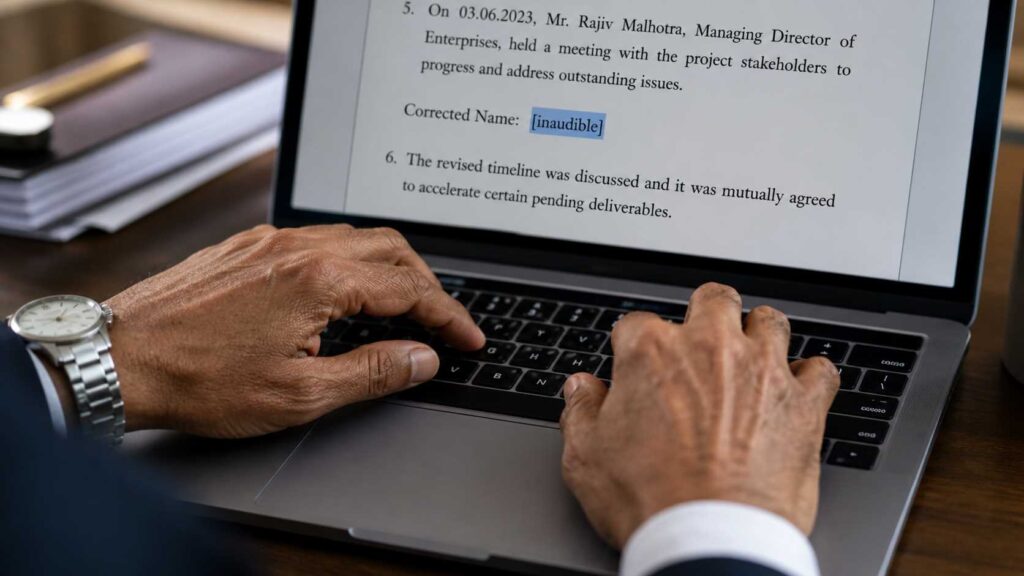
Play the audio file in one window and read the transcript in another. Go slowly — there is no rush. Listen for these specific types of errors:
| Common AI Error | What It Looks Like | What You Fix It To |
|---|---|---|
| Wrong word (sounds similar) | “their” instead of “there” | Correct the word |
| Missing punctuation | Long run-on sentence with no periods | Add periods and commas |
| Filler words left in | “um,” “uh,” “you know,” “like” | Delete them |
| Name misspelled | “Jenifer” instead of “Jennifer” | Fix if you can confirm |
| Two speakers mixed up | Speaker A’s words labeled as Speaker B | Reassign the correct speaker label |
| Numbers written wrong | “for” instead of “4” | Write numerals where appropriate |
⚠️ Important tip for beginners
If you cannot clearly hear a word, type [inaudible] in brackets. Do not guess. Clients respect honesty far more than a wrong word presented as correct. Accuracy is your most valuable asset.
Step 4 — Format and Deliver
Once you’ve cleaned the transcript, copy it into a Word document (or Google Doc). Use these simple formatting rules:
- Put each speaker’s name at the start of their section, in bold: SARAH:
- Start a new paragraph each time a new speaker begins
- Use a 12-point font, standard margins, 1.5 line spacing
- Include a header with the client’s name, date, and audio file name
Send it back to the client as a Word (.docx) file unless they asked for something else. That’s it — job complete.
Where to Find Paying Clients (3 Beginner-Friendly Options)
Here are the three best places for seniors to find transcription work — listed from easiest to slightly more involved:
Option 1 — Fiverr (Best Starting Point)
Fiverr is a freelance marketplace where you create a “gig” — a listing that explains what service you offer and how much it costs. Clients browse and purchase directly. You don’t have to apply for jobs; clients come to you.
Suggested starter listing title: “I will clean and edit AI-generated transcripts professionally”
Suggested starting price: $10–$15 for a 10-minute audio file. Once you have five reviews, raise it to $20–$25.
Tip: Write your Fiverr description the way you’d explain it to a friend. Mention that you are detail-oriented and experienced with careful listening. You don’t need to say you’re new — just focus on what you can do.
Option 2 — Rev.com (Steady Work, No Selling Required)
Rev.com is a professional transcription company that hires freelancers to edit AI-generated transcripts. They send work to you — you don’t need to find clients yourself.
The application process involves a short test transcription to show your accuracy. Pay ranges from about $0.45–$1.10 per audio minute. For a 10-minute file, that’s $4.50–$11. Not high — but it’s consistent, predictable work with no selling involved. Many seniors use Rev as their “training wheels” before moving to Fiverr at higher rates.
Note: Rev currently has a waitlist for new transcriptionists. Apply and check back weekly — spots open regularly.
Option 3 — Facebook Groups (Hidden Gem)
Many podcasters, coaches, and small business owners post in Facebook groups looking for transcription help. Search for groups like “Podcast Editors,” “Online Business Owners,” or “Virtual Assistants” and simply post: “I offer clean, accurate AI transcript editing — happy to do a free test on your first file.” You will often find a client within 48 hours.
How Much Can You Realistically Earn? (Honest Numbers)

Let’s be straightforward. You will not get rich from transcription. But as a part-time income that fits around your life, it is genuinely achievable — and the numbers below are based on what real beginners earn, not optimistic projections.
| Where You Are | Hours Per Day | Typical Monthly Income | Timeline to Get Here |
|---|---|---|---|
| Just starting out | 1 hour | $80 – $200 | Week 1–2 |
| Getting comfortable | 1.5 hours | $200 – $350 | Week 3–4 |
| Repeat clients + reviews | 2 hours | $350 – $550 | Month 2 |
| Specialized niche (medical/legal) | 2–3 hours | $600 – $1,000+ | Month 4–6 |
The $500/month target is realistic at around 2 hours of work per day — typically reached by your second month once you have repeat clients and a few solid reviews.
📌 A note on Social Security
If you receive Social Security benefits, earning income from freelance work may affect your benefits depending on your age and situation. Before you begin, it’s worth reviewing the SSA’s guidelines on working while receiving benefits. For most people over 67 (full retirement age), there is no earnings limit.
Three Niches Where Transcriptionists Earn More
General transcription (podcasts, interviews, meetings) is a great starting point. But if you have a professional background, you may be able to move into a higher-paying niche quickly.
1. Medical Transcription
Doctors and medical practices need accurate written records of patient visits, dictations, and reports. If you worked in healthcare — as a nurse, medical assistant, receptionist, or office administrator — you likely already know the terminology. Medical transcriptionists earn $18–$30 per audio hour on specialized platforms. The American Health Information Management Association (AHIMA) offers recognized credentials that can increase your earning potential significantly.
2. Legal Transcription
Law firms, courts, and attorneys need transcripts of depositions, hearings, and client meetings. This pays well — often $40–$70 per audio hour for experienced transcriptionists — but requires attention to specific legal formatting. If you have a legal, administrative, or paralegal background, this niche is worth exploring. Platforms like Verbit specialize in legal and court transcription.
3. Academic / Research Transcription
Universities and researchers need transcripts of interviews, focus groups, and recorded lectures. This work tends to be detailed and slow-paced — a good fit for someone who prefers thoroughness over speed. Rates are typically $1–$3 per audio minute. Check platforms like Scribie for academic work.
Copy-Paste Prompts to Speed Up Your Work with ChatGPT
Here’s a time-saving trick most beginners don’t know: after you get the raw AI transcript from Otter.ai, you can paste it into ChatGPT (free version works fine) and ask it to do a first pass of cleanup. You still review the result yourself — but it cuts your editing time by 30–40%.
📋 Prompt #1 — General Cleanup
📋 Prompt #2 — Format for Readability
📋 Prompt #3 — Turn Transcript Into a Blog Post (Upsell Service)
That last prompt is especially valuable: many podcasters desperately want blog posts from their episodes. Offering “transcript + blog post” as a bundle lets you charge $30–$50 instead of $15. It takes maybe 10 extra minutes.
Your 30-Minute Setup Plan: Start Today, Not Someday
Most people read an article like this, feel motivated, and then do nothing because the starting point feels unclear. Here is exactly what to do in the next 30 minutes:
Minutes 1–5: Create Your Otter.ai Account
Go to otter.ai. Click “Sign Up Free.” Enter your email and create a password. Confirm your email. Done.
Minutes 6–15: Practice With a Free Sample
In Otter.ai, click “Import.” Find a YouTube video — a news interview or a podcast works perfectly. Copy the YouTube URL, paste it into Otter’s import box, and let it generate a transcript. Read through what it produced.
Minutes 16–25: Edit That Practice Transcript
Play the YouTube video while reading the Otter transcript. Find three errors and fix them. Notice how it feels. Notice that it’s not hard. This experience matters more than any advice in this article.
Minutes 26–30: Create Your Fiverr Profile
Go to Fiverr.com, create a free account, and start building your first gig. Title: “I will proofread and clean AI-generated transcripts.” Price: $12 for 10-minute audio. You don’t need to publish it today — but start it now while the momentum is there.
6 Mistakes Beginners Make (And How to Avoid Them)
These are the issues that trip up most first-timers. Knowing them in advance saves you time and frustration.
- Typing manually instead of using AI tools. Some beginners feel they should type everything from scratch to “do it properly.” Don’t. The AI does the heavy lifting — your job is to correct, not retype. Working manually cuts your earnings in half.
- Charging too little for too long. Starting at $10 is fine. Staying at $10 after you have good reviews is leaving money on the table. Raise your rate after your first five positive reviews.
- Skipping the audio entirely. Some editors try to just read the AI transcript without listening to the audio. You will miss errors. Always listen while you read — at 75% playback speed if needed.
- Working too fast. Transcription pays by the job, not by the hour, which can make you feel pressure to rush. Accuracy matters more. One sloppy transcript can cost you a client and a review.
- Ignoring scams. Some fake clients ask you to do “test work” for free, then disappear. Only offer free tests to people who have an established profile with reviews. If something feels wrong, trust that instinct. This guide on how to avoid remote job scams covers the red flags in detail.
- Waiting until everything is “perfect” before starting. There is no perfect. Your second transcript will be better than your first. Your tenth will be better than your fifth. The learning happens by doing — not by preparing.
What to Try After You’ve Gotten Comfortable
Once you have a few weeks of transcription under your belt, you’ll have more confidence — and you’ll start to see other opportunities. Here are a few paths seniors commonly move into from transcription:
- Add ChatGPT to your workflow to create blog posts or summaries from transcripts — see our guide on profitable ChatGPT jobs for seniors
- Explore other flexible remote work with our roundup of the easiest remote jobs for seniors in 2026
- Compare other AI side income ideas — our guide to the best AI side hustles for beginners over 50 covers several options that pair well with transcription
- Upgrade your tools — if you’re not sure which AI tools to use for different tasks, our breakdown of the best AI tools for seniors in 2026 is a practical starting point
Frequently Asked Questions – Earn Money With AI Transcription
No. Because the AI does the initial typing for you, your job is mainly to read and correct — not to type from scratch. Average typing speed (around 35–45 words per minute) is more than enough. Focus on accuracy, not speed.
A basic laptop or desktop computer, a reliable internet connection, and a pair of headphones or earbuds (so you can hear the audio clearly). That’s it. You do not need a microphone, camera, or any special hardware.
Demand for transcription is consistent throughout the year because it’s tied to ongoing business activities — podcasting, legal proceedings, medical practices, and corporate meetings all continue year-round. You may see a slight dip in December during the holidays, but it recovers quickly in January.
Many people with mild to moderate hearing loss do this work successfully by using high-quality headphones, slowing the audio playback speed to 60–75%, and increasing the audio volume on their computer. If your hearing loss is more significant, you may find the work challenging — but it’s worth trying with a practice file first before deciding.
On platforms like Fiverr, clients pay upfront before you begin work. Fiverr holds the money and releases it to you after you deliver the job. You withdraw to PayPal or a bank account. This system protects you from non-payment — the money is already secured before you do any work.
For a beginner, expect about 35–50 minutes for a 10-minute audio file. As you get more experience, this drops to 25–30 minutes. A useful benchmark: professional transcriptionists say one hour of audio typically takes three to four hours to edit. Your early jobs will be slower — that’s normal and expected.
Yes — freelance income is taxable in the United States. If you earn more than $400 in a year from self-employment, you are required to report it. Fiverr will send a 1099-K form if you earn over $600 in a calendar year. Keep simple records of what you earn each month. For specific tax questions, consult a tax professional or visit the IRS Self-Employed Tax Center.
Final Thoughts: The Best Time to Start Is Right Now
If you’ve read this far, you already know more about AI transcription than most people who will try to start this week. That knowledge is only useful if you act on it.
The biggest barrier isn’t technical skill. It isn’t age. It’s the voice that says “let me think about it a little more.” That voice has kept a lot of people from earning extra money they genuinely needed and could have had.
Here is what we know: people over 55 often outperform younger transcriptionists in accuracy and client satisfaction — because patience, careful listening, and professional communication are skills that take decades to build. You have them. The technology is just a tool.
Your one action right now: Open Otter.ai in a new tab. Create a free account. Paste in a YouTube link. See what appears. That single action breaks the barrier — everything after it is much easier.
You don’t need to be perfect. You just need to start.