

If you’ve ever organized a school event, managed a department, coordinated volunteers, or just kept a busy household running on schedule — you already have the core skills to become a virtual project manager for seniors. This role is one of the most realistic, well-paying, and flexible remote opportunities available to people over 55 in 2026. No coding , design skills, need to reinvent yourself. Just your existing wisdom — applied through simple online tools.
Here’s the part that surprises most people: businesses are actively struggling to find reliable, experienced project coordinators. And the word “virtual” just means you do it from your kitchen table instead of a corner office. In this guide, I’ll walk you through exactly what this work involves, which tools to use, how to land your first client, and what you can realistically earn — week by week.
📋 What You’ll Learn in This Guide
- What a virtual project manager actually does (no jargon)
- Real-life story: How Barbara, 63, got her first client in 18 days
- The 3 types of PM services seniors can offer right now
- Step-by-step setup (with exact clicks and screenshots described)
- Which tools to use — and which to ignore
- Copy-paste templates you can use today
- Common mistakes and how to avoid them
- Realistic earning timeline and income potential
- 30-Minute Setup Plan
- FAQ + Yoast SEO settings
What Does a Virtual Project Manager Actually Do?

Let’s strip away all the corporate language. A virtual project manager helps a business or team stay organized, hit their deadlines, and communicate clearly — all done remotely via computer.
You are not the person doing the actual work (writing, designing, coding). You are the person making sure the right people do the right things at the right time. Think of yourself as a trusted conductor — you don’t play every instrument, but without you, the whole orchestra falls apart.
On any given day, a virtual project manager might:
- Check which tasks are on track and which are falling behind
- Send a short update email to a client or team leader
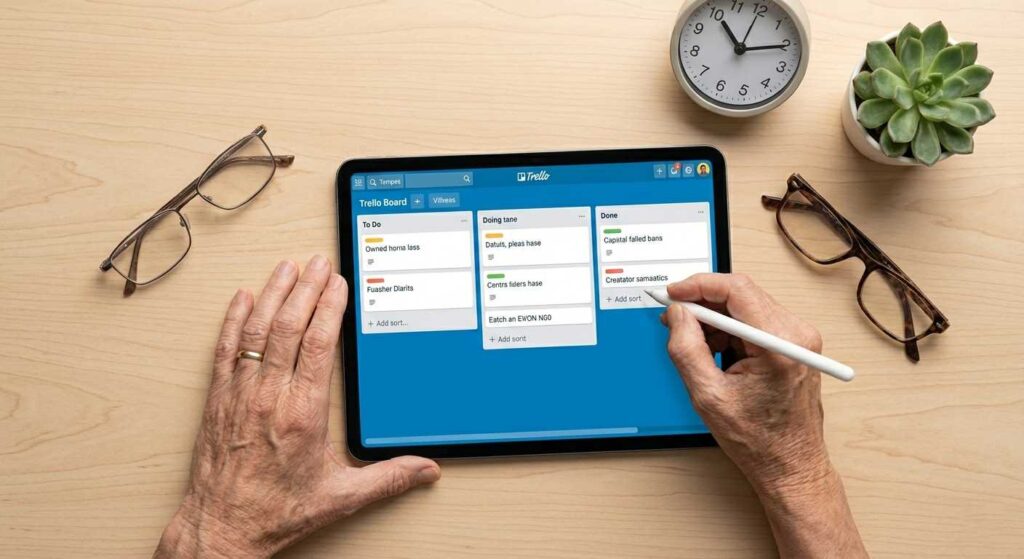
- Update a task board (Trello, Asana, or ClickUp) with new deadlines
- Schedule a 20-minute check-in via Zoom
- Write a simple weekly progress report
- Flag a problem to the business owner before it becomes a crisis
That’s genuinely it for a beginner. No technical wizardry. No complicated software. Just clear communication, consistent follow-through, and a calm head when things get busy.
💡 Senior Advantage: Younger freelancers often underestimate the value of patience, reliability, and professional communication. These are the exact qualities clients pay a premium for — and they come naturally to most people over 55 with career experience.
Real-Life Story: How Barbara, 63, Got Her First Client in 18 Days

Barbara had spent 27 years as an office manager at a regional insurance company in Ohio. When she retired at 62, she loved the freedom — for about four months. Then she missed the structure, the problem-solving, and frankly, the extra income her Social Security check wasn’t covering.
She found an article about virtual project management, thought it sounded suspiciously like what she’d done her whole career, and decided to try it. Here’s exactly what she did:
Week 1: She created a free Upwork account and a LinkedIn profile describing her 27 years of office coordination experience. She didn’t call herself a “project manager” — she called herself an “experienced operations coordinator available for remote work.” That honesty helped.
Week 2: She learned one tool — Trello. Watched three YouTube tutorials, created a practice board for a fake client project, and took a screenshot of it for her portfolio.
Week 3: She applied to 12 jobs on Upwork: small businesses looking for help organizing ongoing projects. She sent personalized proposals, not generic copy-paste messages. Most ignored her. Two replied. One hired her at $18/hour for 10 hours a week.
Her first-month income: $720. By month four, she had two clients, was working 20 hours a week, and earning $1,600/month — more than she’d expected when she started.
“I kept thinking I wasn’t technical enough,” she told me. “But my client didn’t need someone technical. They needed someone who would actually show up consistently and keep things from falling through the cracks. That I could do.”
The 3 Types of PM Services Seniors Should Start With
Don’t try to offer everything at once. Beginners who specialize land clients faster. Here are the three most beginner-friendly services:
1. Task Tracking and Board Management
You maintain a shared project board (Trello, Asana, or ClickUp). You update task statuses, add deadlines, flag overdue items, and send weekly summaries. This is the easiest entry point — most small businesses have no system at all, so even a basic organized board is a huge improvement.
2. Weekly Project Reporting
Every week, you send the business owner a short, clear update: what was completed, what’s in progress, what’s at risk, and what needs a decision. Many small business owners are drowning in the day-to-day and have no visibility into their own projects. You give them that visibility. This can be done in under two hours per client per week.
3. Meeting Coordination and Follow-Up
You schedule team meetings, create simple agendas, take notes during the call, and send a summary of action items afterward. If you’ve ever run a staff meeting, you can do this in your sleep.
Not sure which type to start with?
If you’re comfortable with email and basic scheduling, start with Option 2 (Weekly Reporting). It requires no specialized tools and lets you demonstrate value immediately. Once you have a client, you can naturally expand into task tracking.
Step-by-Step Guide: How to Set Up and Get Your First Client
- Set Up Your Free Trello Account
Go to trello.com and click “Sign Up.” Use your email address. Choose a password you’ll remember. Once inside, click “Create a Board.” Name it something like “Sample Client Project.” Add three columns: To Do, In Progress, and Done. Add 4–5 sample tasks to each column. This becomes your portfolio — take a screenshot.
- Create or Update Your LinkedIn Profile
Go to linkedin.com and sign in (or create a free account). Click your profile picture area → “Edit profile.” In the headline (the short line under your name), write something like: “Remote Project Coordinator | Helping Small Businesses Stay Organized | 20+ Years of Management Experience.” In the “About” section, describe your career in plain language — don’t use jargon, just be honest about what you’ve done. This is your professional credibility page. Learn more about optimizing it at our guide on LinkedIn profile tips for people over 50.
- Create an Upwork Profile
Go to upwork.com → click “Sign Up as a Freelancer.” Complete every section of your profile. Upload a clear, professional headshot (even a smartphone photo in good lighting works). In the “title” field, write: “Virtual Project Manager | Task Tracking & Team Coordination.” Set your hourly rate at $18–$22/hour to start — you’ll raise it once you have reviews. Read our detailed guide on creating your Upwork profile as a senior for a full walkthrough.
- Write Your First Proposals
Search Upwork for: “project coordinator,” “task manager,” “virtual project manager,” or “operations coordinator.” Filter by “Entry level” and “Less than 30 hrs/week.” When you find a job that fits, click “Submit Proposal.” Do NOT use a generic message. Read their job description carefully and reference specific things they mentioned. I’ll give you a template in the next section.
- Apply Consistently for 3 Weeks
Most people give up after three rejections. Don’t. Apply to at least 5 jobs per day for three weeks. Track your applications in a simple spreadsheet (date, job title, company, response). Even a 10% response rate means you’ll have conversations. Even a 5% hire rate means a client within three weeks. This is a numbers game at first.
Tools You Actually Need (And Which to Ignore)
The internet will make you feel like you need 15 different tools. You don’t. Here’s the real list for a beginner:
| Tool | What It Does | Cost | Difficulty |
|---|---|---|---|
| Trello | Visual task board — drag and drop cards between columns | Free | Very Easy |
| Google Docs | Write project updates, meeting notes, shared reports | Free | Very Easy |
| Google Calendar | Schedule meetings, set deadline reminders | Free | Easy |
| Zoom | Video calls with clients and teams | Free (up to 40 min) | Easy |
| Slack (if required by client) | Team messaging instead of email | Free | Moderate |
| Asana or ClickUp (intermediate) | More powerful task management — learn after first client | Free tiers available | Moderate |
Do NOT try to learn all of these at once. Start with Trello + Google Docs + Zoom. Add others only when a specific client requires them. Our guide on digital collaboration tools for seniors explains each one in plain English with pictures.
Also worth noting: AI tools like ChatGPT can dramatically speed up your work once you’re comfortable. For example, you can describe a project situation and ask ChatGPT to draft a client update email for you. Our ChatGPT guide for seniors walks through this without any tech background required.
Copy-Paste Templates You Can Use Today
Template 1: Upwork Proposal Message
📋 COPY THIS PROPOSAL (customize the bracketed parts):
Hi [Client Name or “there”], I noticed you’re looking for help keeping [project/team/operations] organized — that’s exactly where I specialize. I spent [X years] as a [your role] managing [briefly describe what you managed]. I’m now offering those same skills remotely, and I’d love to help your team stay on track. Specifically, I can help you: — Set up and maintain a clear task board so nothing falls through the cracks — Send you a weekly progress summary so you always know where things stand — Follow up with team members so deadlines are actually met I’m reliable, easy to communicate with, and detail-oriented. I’m available [your hours], and I’m happy to do a free 20-minute call to see if we’re a good fit. Looking forward to hearing from you, [Your Name]
Template 2: Weekly Client Update Report
📋 COPY THIS WEEKLY UPDATE TEMPLATE:
Subject: Weekly Project Update — [Project Name] — Week of [Date] Hi [Client Name], Here’s your quick weekly snapshot: ✅ COMPLETED THIS WEEK: – [Task 1] – [Task 2] 🔄 IN PROGRESS: – [Task 3] — on track, expected completion [date] – [Task 4] — slight delay, updated deadline [date] ⚠️ NEEDS YOUR ATTENTION: – [Any decision the client needs to make] 📅 NEXT WEEK’S PRIORITIES: – [Task 5] – [Task 6] Let me know if you have any questions. Happy to jump on a quick call if helpful. Best, [Your Name]
💡 Pro Tip: This weekly update email takes about 15 minutes to write once you know the project. Clients love it. It’s often the #1 reason they give great reviews — it makes them feel informed and in control without having to chase anyone down.
What I’ve Seen Working With Seniors in This Field
I’ve worked with dozens of seniors exploring remote work over the past few years. The pattern I see repeatedly is this: the people who succeed fastest are not the most tech-savvy. They’re the most consistent.
When I tested this exact approach with a group of women over 60 in an online workshop I ran last year, the ones who got clients within three weeks all shared the same habits: they applied every day (even when discouraged), they personalized every proposal, and they followed up on conversations that went quiet.
The people who struggled? They spent two weeks trying to master every tool before applying to a single job. Analysis paralysis is real, and it’s the biggest obstacle I see. The tools don’t matter until you have a client. Get the client first. Learn the tools together with them.
One woman — a retired hospital administrator from Tennessee — told me she felt embarrassed applying for a $20/hour job after a career earning a six-figure salary. I told her what I’ll tell you: your first Upwork client is not your career ceiling. It’s your launch pad. Once you have your first review, you move up fast.
Practical Use Cases: What You’ll Actually Do Day-to-Day
Let’s make this concrete. Imagine you’ve landed your first client: a small digital marketing agency with a team of five remote freelancers scattered across different time zones. The agency owner is brilliant at sales but terrible at organization.
Here’s what your typical week looks like:
Monday morning (30 minutes): Log into Trello. Review all task cards. Move anything completed to the “Done” column. Flag any overdue tasks in red. Add two new tasks the owner mentioned in a Friday email.
Tuesday (15 minutes): Send a quick “checking in” Slack message to the two freelancers whose tasks are due Thursday. Not nagging — just a friendly heads-up.
Wednesday (20 minutes): Join the team’s weekly Zoom call. Take notes on decisions made and action items assigned. Send out a meeting recap within 2 hours.
Friday (30 minutes): Write and send the weekly update email to the owner using your template. Update the Trello board one final time for the week.
Total time per week: roughly 7–10 hours. At $22/hour, that’s $154–$220 from one client. Add a second client and you’re at $300–$440/week working part-time hours from home.
This scales naturally. As you get comfortable, you can take on more clients, offer more services, or specialize in an industry (healthcare, e-commerce, nonprofits) where your background gives you extra credibility. If you have a corporate background, check out our guide on transitioning from corporate to consulting for ideas on positioning yourself at a higher rate.
Common Mistakes Seniors Should Avoid
🚨 Mistake #1: Waiting Until You Feel “Ready”
There is no moment when you’ll feel fully ready. Apply for jobs while you’re still learning. Your first client will teach you more than any tutorial.
🚨 Mistake #2: Charging Too Little for Too Long
Starting at $15–18/hour is fine. Staying there after six months is a mistake. Raise your rate with every new client after your first three reviews.
🚨 Mistake #3: Trying to Learn Every Tool Before Applying
Trello is enough to get started. Period. ClickUp, Asana, Monday.com — learn them only when a client requires it.
🚨 Mistake #4: Writing Generic Proposals
“I am a hardworking professional with 20 years of experience” tells a client nothing. Reference their specific situation. Show you read their posting.
🚨 Mistake #5: Underestimating Your Experience
If you managed people, coordinated schedules, handled budgets, organized events, or kept any kind of team functioning — that IS project management. Own it.
🚨 Mistake #6: Ignoring LinkedIn
Many senior freelancers skip LinkedIn and only use Upwork. But several of the most successful seniors I’ve spoken to got their best-paying clients directly through LinkedIn — not job boards. Don’t neglect it.
Realistic Earning Potential: What to Actually Expect
Here’s an honest breakdown based on real patterns I’ve observed, not optimistic marketing numbers:
| Stage | Timeline | Hourly Rate | Hours/Week | Monthly Income |
|---|---|---|---|---|
| Beginner (first client) | Weeks 2–6 | $15–$22 | 8–12 hrs | $480–$1,056 |
| Growing (2 clients) | Months 2–4 | $20–$28 | 15–20 hrs | $1,200–$2,240 |
| Established (3+ clients) | Months 4–8 | $28–$40 | 20–25 hrs | $2,240–$4,000 |
| Specialized/Expert | Month 8+ | $40–$65 | 15–25 hrs | $2,400–$6,500 |
The “specialized” tier comes when you focus on a specific industry (healthcare administration, construction, e-commerce) or a specific service (agile sprint management, project recovery for stalled initiatives). Seniors with deep industry backgrounds often reach this tier faster than they expect.
If you’re interested in building more passive or scalable income alongside this work, our guide on passive income for seniors covers complementary options that pair well with freelance project management.
Does This Affect Your Social Security?
This is one of the most common questions seniors ask — and it’s a smart one. If you are under your full retirement age and still receiving Social Security benefits, there are earnings limits that can temporarily reduce your benefits. Once you reach full retirement age, you can earn any amount without reduction. We’ve written a detailed explanation in our guide on earning income while on Social Security — please read it before you start earning significant freelance income, and consider speaking with a financial advisor about your specific situation.
Should You Get a Project Management Certification?
Short answer: not immediately. You do not need a PMP (Project Management Professional) certification to get your first client as a freelancer. Certifications cost hundreds of dollars and months of study time — and clients hiring on Upwork care far more about your communication skills and reliability than your credentials.
That said, if you want to move toward higher-paying roles or work with larger companies down the road, a certification helps. The Google Project Management Certificate on Coursera is a well-regarded, affordable option that takes about 6 months at a part-time pace. The Google Project Management Certificate is specifically designed for career changers with no prior PM experience — it’s a solid choice if you want to invest in formal credentials later.
PMI (the Project Management Institute) is the gold standard for the full PMP certification. You can explore requirements at PMI’s official website.

The 30-Minute Setup Plan
| Time Block | Action | Outcome |
|---|---|---|
| 0–8 minutes | Create free Trello account at trello.com | You have your main task management tool |
| 8–15 minutes | Create a practice board with 3 columns and 5 sample tasks | You have a portfolio screenshot ready |
| 15–22 minutes | Create or update Upwork profile headline and bio | You appear in search results for PM roles |
| 22–30 minutes | Search “project coordinator” on Upwork and apply to one job using the template above | Your first proposal is sent |
After this 30-minute session, you’re not just thinking about becoming a virtual project manager — you’re actually one, actively in the market. That mindset shift matters enormously.
Ready to take the next step?
Explore more ways seniors are building income online — from freelancing to consulting to AI-powered work:
👉 How seniors are making money with AI in 2026 →
👉 Complete freelancing guide for seniors →
Beginner Tips That Actually Make a Difference
- Apply every day, not in batches. Consistency beats volume. Five applications a day for three weeks beats 50 in one frantic session.
- Respond within 2 hours. When a client replies to your proposal, speed matters. Many freelancers take days to reply. Be the one who responds in an hour and immediately feels more professional.
- Ask smart questions early. On your first call with a client, ask: “What does success look like for you at the end of our first month together?” This tells you exactly what to prioritize.
- Under-promise and over-deliver. Say you’ll send the update by Friday morning. Send it Thursday afternoon. Do this consistently and you’ll get great reviews without breaking a sweat.
- Keep a simple work log. Write down what you did each day for each client. Useful for invoicing, for reviews, and for your own confidence when you feel like “am I actually helping?”
- Don’t disappear when things go wrong. If a deadline slips or there’s a mistake, communicate about it immediately. Clients don’t expect perfection. They expect honesty and solutions.
Frequently Asked Questions – Virtual Project Manager For Seniors
No. Any experience coordinating people, managing schedules, overseeing events, or keeping a team organized qualifies. Former teachers, office managers, nurses, community organizers, and household managers have all successfully made this transition. What matters is reliability and communication — not credentials.
Most seniors who apply consistently (5+ proposals per day) land their first client within 2–5 weeks. Some faster, some slower. The biggest variable is how personalized and specific your proposals are. Generic proposals rarely convert. Specific, relevant proposals often get responses within 24 hours.
No. LinkedIn is equally powerful — especially if you have a strong professional background. You can post content about project management, connect with small business owners, and reach out directly. Other options include Fiverr (for structured, packaged services), direct outreach to local businesses, and referrals from your existing network. Our Fiverr guide for seniors explains how that platform works differently from Upwork.
Ask them to give you a brief walkthrough, or spend 30 minutes watching YouTube tutorials for that specific tool. Most PM tools are designed to be intuitive. You will not be the first person to learn Asana or Monday.com as an adult. Clients are generally patient with a short learning curve when you’re otherwise excellent to work with.
Absolutely. Virtual project management is one of the most flexible remote jobs precisely because your actual on-screen time is relatively limited. Many seniors with health considerations work 10–15 hours a week with one or two clients, earning $800–$1,500/month on a schedule they fully control. See our resource on remote jobs for seniors with disabilities for more options suited to different physical needs.
Conclusion: Your Experience Is the Qualification
The biggest misconception about becoming a virtual project manager for seniors is that it requires learning an entirely new skill set. It doesn’t. It requires recognizing and repackaging the skills you’ve spent decades building — and applying them in a new environment.
Small businesses are desperate for organized, reliable people who can keep projects moving without being micromanaged. They’re not looking for a 28-year-old with a PMP certification. They’re looking for someone who actually follows through. Someone who communicates clearly. Someone who doesn’t let things fall apart.
That’s you. It’s already you. The only thing left is to start.
Set up your Trello board tonight. Update your LinkedIn profile this week. Send your first Upwork proposal before the weekend. By next month, you could be having your first client call. By month three, you could have income you didn’t think was possible at this stage of life.
If you’re thinking about other ways to supplement your income alongside this, explore our guide on the best side hustles for retirees in 2026 for complementary ideas that work well with a flexible schedule.
Last reviewed and updated: April 28, 2026 by the SeniorGig Team.