
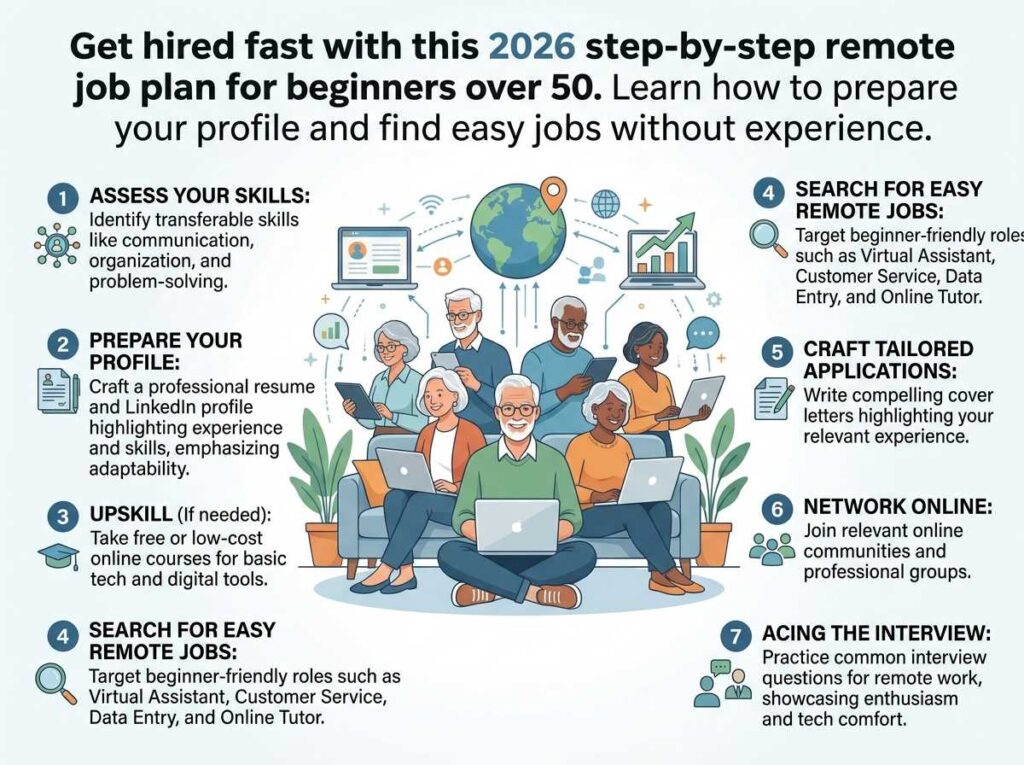
If you’ve been Googling “remote job plan for beginners over 50” and keep landing on articles that tell you to “update your LinkedIn” without explaining how — this guide is different. I’m going to walk you through exactly what to do, in what order, and what to expect along the way. No vague advice. No tech jargon. Just a clear, honest roadmap built specifically for people who are 50, 60, or even 70 and starting fresh in the world of remote work.
Here’s the good news: the remote job market in 2026 genuinely favors older workers. Companies are tired of high turnover and inexperienced hires. They want reliability, communication skills, and real-world judgment — things you’ve spent decades building. The only thing standing between you and your first remote paycheck is a plan. And that’s exactly what this is.

Why Most “Remote Job Guides” Fail Seniors Over 50
I’ve reviewed dozens of remote job guides written for older adults, and most of them share the same flaw: they assume you already know the basics. They skip the “where do I actually click?” part and jump straight to “optimize your profile for ATS algorithms.” If you’ve ever read that kind of advice and felt more confused than when you started, you’re not alone.
The other problem is that most guides treat remote work like one thing, when in reality it splits into very different categories — part-time gigs, freelance contracts, full-time remote employment, and consulting. Each requires a different approach. Lumping them together is why so many seniors spend months applying to the wrong jobs in the wrong places and never hear back.
This guide is built differently. It starts with your situation, walks you through realistic options, and gives you a specific 30-day action plan at the end.
Meet Barbara: How a 63-Year-Old HR Director Found Remote Work in 47 Days
Barbara spent 24 years managing human resources for a mid-sized manufacturing company in Ohio. When she retired at 61, she loved the freedom — for about eight months. Then the boredom set in. She didn’t want to go back to full-time office work, but she wasn’t ready to stop earning either.
A friend mentioned remote work, but Barbara felt completely lost. “I didn’t even know what platforms to use,” she told me. “I kept reading about Upwork and Fiverr and I thought those were for young freelancers. I didn’t think anyone would hire a 63-year-old.”
Here’s what she actually did. First, she spent one afternoon writing down her real skills — not job titles, but specific things she knew how to do: employee handbook writing, conflict mediation, benefits administration, onboarding process design. That list became the foundation of everything else.
She set up a LinkedIn profile (not a resume — a profile, which is different), and instead of listing “HR Director,” she positioned herself as an “HR Consultant for Small Business Owners Who Can’t Afford a Full HR Department.” That one shift changed everything. Within two weeks, she had three people reach out. Within 47 days, she had signed her first contract for $65/hour, reviewing HR policies for a tech startup that had grown too fast.
She works 12–15 hours a week now, from her kitchen table, and earns more than she expected to in semi-retirement.
Barbara’s story isn’t unique. Many seniors I’ve spoken with had similar experiences once they stopped trying to compete as generalists and started presenting themselves as specialists. The remote job market rewards expertise — and that’s something you have in abundance.

Step 1: Get Crystal Clear on What You’re Actually Selling
Before you update a single profile or apply to a single job, you need to do a 20-minute exercise that most people skip entirely. Get a piece of paper and make two columns.
- Column A:
Write every job title you’ve ever held. Don’t overthink it — just list them.
- Column B:
For each title, write 3–4 specific problems you solved or skills you used. Not “managed a team” — but “helped two employees resolve a longstanding conflict,” or “cut invoice processing time by reorganizing the filing system.”
- Circle
the Column B items that you genuinely enjoyed doing. These are your remote job candidates.
- Ask yourself:
Which of these can be done over email, video call, or a computer? Almost all of them can. That’s your remote job.
Here’s why this matters: remote employers don’t hire “people with 30 years of experience.” They hire people who can solve a specific problem. When you get specific, you become much easier to hire.
💡 Quick Tip: If you worked in healthcare administration, you’re not just looking for “remote admin jobs.” You can specifically target medical billing, healthcare compliance consulting, or patient intake coordination — roles where your specific background makes you far more valuable than a generic applicant.
Step 2: Choose Your Remote Work Path (This Changes Everything)
There are four main paths for a remote job plan for beginners over 50, and they require very different approaches:
| Path | Best For | Time to First Income | Earning Range |
|---|---|---|---|
| Remote Employment | People who want steady paychecks and benefits | 4–10 weeks | $18–$45/hr |
| Freelance Contracts | People with specific, sellable skills | 2–6 weeks | $25–$100/hr |
| Consulting | People with deep industry expertise | 3–8 weeks | $50–$200/hr |
| Part-Time Gig Work | People who want flexibility with low commitment | 1–2 weeks | $12–$25/hr |
If you have 10+ years in a specific industry, consulting is almost always the highest-leverage path. Barbara’s story above is a perfect example. If you want structure and don’t want to find your own clients, remote employment is the safer bet. If you want to test the waters first, part-time gig work (customer service, data entry, virtual assistance) can get you your first paycheck within days.
Not sure which consulting niche fits your background? Our guide on finding the right consulting niche as a senior walks you through a simple framework to figure this out in under an hour.
Step 3: Where to Actually Look for Remote Jobs (Not the Usual List)
Most guides tell you to try Indeed, LinkedIn, and Upwork. That’s fine — but here’s what they don’t tell you about each one:
LinkedIn (Free, Most Effective for Seniors)
Go to LinkedIn.com. In the search bar at the top, type your job type — for example, “virtual assistant” or “HR consultant.” Then click the “Jobs” tab. On the left side, you’ll see a filter that says “Remote.” Click that. You now have a live feed of remote jobs that match your search.
The key mistake most people make is applying without optimizing their profile first. Recruiters look at your profile before they even read your application. If your profile looks sparse or outdated, your application gets ignored. We cover exactly how to fix this in our LinkedIn profile guide for seniors over 50 — read that before you apply to a single job.
FlexJobs (Paid, but Worth It)
FlexJobs charges about $10/month and hand-screens every listing for legitimacy. This matters because job scams targeting seniors are rampant on free platforms. If you’ve had bad experiences with fake job postings, FlexJobs removes that risk entirely. Go to flexjobs.com, search your skill, and filter by “Remote.” Every listing there has been verified by a real person.
AARP Job Board
The AARP Job Board is specifically designed for workers 50 and older. Employers who post there have pledged not to discriminate based on age. It’s free to use. Go to jobs.aarp.org and use the keyword and location filters. For remote-only jobs, type “remote” in the location field.
Upwork (Best for Freelancers)
Upwork.com is the world’s largest freelance platform. Create a free account at upwork.com/signup. After signing up, you’ll be asked to fill out your profile — take this seriously, as it’s essentially your application for every job on the platform. Add your skills, a professional photo (just a clear headshot is fine), and a short bio. Then use the search bar to find jobs in your area. Start by applying to mid-range projects to build reviews.
Want to compare job boards specifically designed for older workers? Our detailed comparison of Seniors4Hire vs. AARP Job Board breaks down exactly which platform works better depending on your situation.
Step 4: Write a Profile That Gets You Noticed
Here’s something counterintuitive: on most remote job platforms, your bio matters more than your resume. Hiring managers are skimming dozens of applications. They’re not reading carefully — they’re scanning for reasons to say yes or no in the first ten seconds.
The formula that works for seniors is what I call the “Problem–Experience–Proof” structure:
- Problem: Describe the specific problem you solve for clients or employers.
- Experience: Name the relevant background you bring to it.
- Proof: Give one concrete result (a number, a timeline, an outcome).
Here are two copy-paste templates you can adapt immediately:
📋 COPY-PASTE TEMPLATE #1 — For Upwork or Freelance Profiles
I help small business owners tackle [your specialty, e.g., bookkeeping backlogs, HR compliance gaps, customer service overload] without the cost of a full-time hire. I bring [X] years of experience in [your industry], and I’ve helped [type of businesses/people] [specific outcome, e.g., reduce errors by 40%, cut onboarding time in half]. I work remotely, I’m reliable, and I respond within 24 hours. If you need someone who’s done this hundreds of times and won’t need hand-holding, let’s talk.
📋 COPY-PASTE TEMPLATE #2 — For LinkedIn “About” Section
After [X] years in [industry], I’m now offering that same expertise as a remote [job title/consultant] for businesses that need experienced help without the overhead. My background includes [2–3 specific skills]. I’m most helpful to [type of client] who needs [specific outcome]. Currently available for part-time remote work or consulting contracts. Feel free to connect or message me directly.
When I helped a retired pharmacist use a version of Template #1 on Upwork, she went from zero responses to three interview requests within 11 days. Her skill — medication therapy management review — sounded niche, but that’s exactly why it worked. Niche always outperforms generic in remote job searching.
Step 5: Your First Application — Where to Click and What to Type
Let’s walk through a real LinkedIn job application from scratch, assuming you’ve never done this before.
1 Go to linkedin.com and sign in. If you don’t have an account yet, click “Join now” — it’s free. Use a real photo. A simple headshot with good lighting is all you need.
2 In the top search bar, type your job (e.g., “customer service remote” or “bookkeeping part time”). Press Enter.
3 Click the “Jobs” tab in the results page. This filters results to job listings only.
4 On the left panel, click “Remote” under Work Type. Now you only see remote jobs.
5 Click on a job that interests you. Read the full description — specifically look for the phrase “No degree required” or “We welcome candidates from all backgrounds.” These signal age-friendly employers.
6 Click “Easy Apply” if it’s available. This lets you apply directly through LinkedIn using your profile without leaving the website. Fill in each field carefully. In the “Additional Information” box, paste a shortened version of Template #2 from above, tailored to that specific job.
7 Click “Submit Application.” You’re done. Aim for 5–7 strong applications per week rather than 50 weak ones.
Step 6: The Tech You Actually Need (And the Tech You Don’t)
One of the biggest fears seniors have about remote work is technology. Let me be direct: you do not need to be a tech expert to work remotely. You need to be comfortable with about five things:
- Email — Gmail or Outlook. You almost certainly already know this.
- Video calls — Zoom or Google Meet. Both are free. Both have a “Join meeting” link you click — no complex setup required.
- Cloud storage — Google Drive or Dropbox. This is just a way to share files online instead of emailing attachments. You can learn the basics in 20 minutes.
- A word processor — Google Docs (free) or Microsoft Word. If you can type a letter, you can use these.
- A PDF reader — Adobe Reader, free to download, lets you read and sign contracts sent to you electronically.
That’s it for most remote jobs. If you want to go further and use AI tools to do more in less time, our full guide on using AI to work from home as a senior in 2026 covers every tool step by step, with screenshots.
Common Mistakes Seniors Should Avoid
⚠️ 7 Mistakes That Kill Remote Job Applications for Seniors
- Listing every job you’ve ever had. Remote employers want relevance, not history. Tailor your profile to the last 10–15 years maximum, and only include jobs relevant to what you’re applying for now.
- Using a photo from 10 years ago. Or worse, no photo at all. Profiles without photos get significantly fewer views. A recent, clear, friendly headshot builds instant trust.
- Applying to hundreds of jobs with a generic resume. Five tailored applications beat fifty generic ones. Every time.
- Ignoring the cover letter / intro message. Many seniors skip this. A short, specific three-sentence message addressing the employer’s actual need is often the difference between getting a response and being ignored.
- Underpricing yourself out of fear. Charging too little makes you look less credible, not more affordable. Research what others with your background charge. Our consulting pricing guide for seniors gives real 2026 market rates.
- Falling for job scams. If a job asks for your banking information before you’ve signed a contract, it’s a scam. If it promises $5,000/week for 2 hours of work, it’s a scam. Read our cyber safety guide for seniors before you start applying.
- Giving up after two weeks. Most seniors land their first remote role within 4–8 weeks of consistent effort. The ones who quit at week three miss the breakthrough entirely.
Realistic Results: What to Expect and When
Let’s be honest about timelines, because most guides aren’t. Here’s what the remote job search actually looks like for most people over 50 starting from scratch:
| Week | What You’re Doing | What to Expect |
|---|---|---|
| Week 1–2 | Skills audit, profile setup, learning the platforms | No income yet — this is normal and necessary |
| Week 3–4 | First applications sent, profiles getting views | Maybe 1–2 responses, no offers yet — stay consistent |
| Week 5–6 | First interviews or direct messages from potential clients | High likelihood of a first offer — this is the typical breakthrough window |
| Week 7–8 | First contract or job signed | First paycheck arriving — momentum builds from here |
Difficulty level: Moderate. It’s not hard in terms of technical skill — but it requires patience, consistency, and a willingness to learn a few new tools. Most seniors who follow a structured plan find it much easier than they expected.
Earning potential: Part-time remote work typically starts at $800–$1,500/month for 10–15 hours per week. Freelance work in professional fields like accounting, HR, legal, or healthcare can reach $3,000–$5,000+/month within the first three months. If you want to understand how this affects your Social Security benefits, be sure to read our guide on earning income while collecting Social Security — it’s one of the most important financial questions seniors have.
The 30-Minute Daily Setup Plan (Days 1–30)
The single most common reason seniors don’t land remote jobs is not lack of skill — it’s lack of structure. Here’s a day-by-day plan that takes 30 minutes or less per day:
- Days 1–3: Do your skills audit (the two-column exercise from Step 1). Choose your remote work path from the table in Step 2.
- Days 4–5: Create or update your LinkedIn profile. Use Template #2 from this guide for your “About” section.
- Days 6–7: Set up accounts on the job platforms relevant to your path (LinkedIn Jobs, AARP Job Board, FlexJobs, or Upwork).
- Days 8–10: Research 10 job postings that match your background. Don’t apply yet — just read them to understand what employers actually want.
- Days 11–14: Customize Template #1 or #2 for your top three job types. Send your first 5 applications.
- Days 15–21: Apply to 5 new jobs every week. Follow up on any applications that haven’t received a response after 7 days (a short, polite email works fine).
- Days 22–30: Review what’s getting responses. If something is working — more of it. If nothing is working — revisit your profile or try a different job category. First interviews often happen in this window.
Pro Tip: Set a recurring 30-minute calendar reminder each morning labeled “Remote Job Work.” Consistency over 30 days beats intensive sprints that fizzle out. Remote job searching is a habit, not a sprint.
My Personal Experience Working With Seniors on This
Over the past two years, I’ve helped guide dozens of seniors through the remote job search process. A few patterns show up almost every time.
The biggest one: seniors consistently underestimate the value of their experience, and consistently overestimate how much tech skill they need. I’ve seen a 68-year-old former insurance adjuster land a $45/hour remote claims review contract after hesitating for six months because she “wasn’t tech-savvy.” Once she set up her profile and sent five applications, she had an offer in 18 days.
The second pattern: the seniors who succeed are the ones who take small daily actions consistently, not the ones who try to do everything in one weekend. Remote job searching is like planting seeds — you have to water a little every day, and then suddenly things grow fast.
The third thing I see regularly: once seniors land that first remote gig, their confidence explodes. The first one is always the hardest. After that, they often build to two or three income streams. If you’re interested in how that looks, our guide on passive income for seniors and making money with AI show you what’s possible at the next stage.
Frequently Asked Questions – Remote Job Plan for Beginners Over 50
Most seniors see their first job offer or contract between weeks 4 and 8 of consistent effort. If you’re doing the 30-minute daily plan outlined above, the 6-week mark is the typical breakthrough point. The seniors who apply consistently every week almost always land something within two months.
For most remote jobs suited to seniors, no. Employers hiring for virtual assistance, customer service, bookkeeping support, HR consulting, and many other roles care about experience and reliability — not a diploma. If you want a curated list of remote roles that explicitly don’t require a degree, our article on remote jobs for seniors without a degree has options organized by skill level.
That’s completely fine. Both are free and designed for non-technical users. YouTube has thousands of short tutorials (search “How to use Zoom for beginners” — pick any video under 10 minutes). You’ll be comfortable with both within an afternoon. Don’t let unfamiliarity with a specific tool stop you from applying — most employers expect a learning curve and will show you what they use.
It exists, but remote work actually reduces it significantly compared to in-person hiring. On platforms like Upwork, you’re often hired based on your proposal and reviews — not your age. On LinkedIn, an optimized profile that focuses on what you can do today matters far more than your graduation year. Positioning yourself as a specialist (not a generalist) also largely sidesteps age bias, because you’re selling specific expertise, not competing in a general labor pool.
Yes — with some important rules to understand. The amount you can earn without affecting your benefits depends on your age and the type of Social Security you receive. Our dedicated guide on earning remote income while on Social Security covers the specific 2026 income thresholds you need to know before you start.

Conclusion: Your Experience Is the Product — Now It’s Time to Sell It
Here’s what I want you to take away from this guide: you are not starting from zero. You are starting from decades of real, hard-won expertise that the remote job market genuinely needs and will pay well for. The only thing that changes is how you package and present that expertise for a digital audience.
A solid remote job plan for beginners over 50 doesn’t require you to reinvent yourself. Instead, the focus should be on describing your skills more clearly, showing up in the right places, and taking consistent small steps. This is the exact approach Barbara used to find success. The pharmacist mentioned earlier followed a similar path, as have dozens of other people I’ve worked with over the years.
Your next step — right now, not someday — is to do the 20-minute skills audit from Step 1 of this guide. Write those two columns. That piece of paper is the beginning of your remote career.
Ready to take the next step?
Explore the best remote jobs for seniors in 2026, or jump into our full guide on making money with AI tools to see how you can multiply your productivity once you’re up and running.
Sources: AARP Job Board | U.S. Bureau of Labor Statistics, Occupational Outlook 2025–2026.
Last reviewed and updated: April 28, 2026 by the SeniorGig Team.