
Table of Contents
- Why Photography Matters for Your Online Business
- Lighting Basics: The Single Most Important Factor
- Create a Simple and Clean Background
- Understanding the Rule of Thirds
- Focus, Stability, and Multiple Angles
- Essential Camera Settings on Your Smartphone
- Best Free Editing Apps for Seniors in 2026
- Editing Tips: Less Is More
- Common Mistakes to Avoid
- Quick Photo Checklist Before You List
- Conclusion
Smartphone photography for seniors is the single fastest way to increase your sales on platforms like Etsy or eBay — no expensive equipment required. In 2026, the camera in your pocket is more powerful than professional studio gear from just a decade ago. Whether you are selling hand-knitted scarves, homemade candles, or vintage collectibles, the quality of your photos directly determines how many buyers click on your listing. This guide will walk you through every step, from setting up your light source to editing your final image, in plain and simple language.
Why Photography Matters for Your Online Business
When a buyer browses an online marketplace, they cannot touch or feel your product. The photo you take is the only thing standing between them and the “Add to Cart” button. A blurry, dark, or cluttered image sends a signal that the product itself might be low quality — even if your craftsmanship is absolutely wonderful.
Think of your product photo as your first handshake with a potential customer. It needs to be confident, clear, and inviting. The good news is that mobile photography for older adults has never been easier. Modern phones handle most of the hard technical work automatically. Your job is simply to control the environment around you — the light, the background, and the angle.
If you are just beginning your journey selling crafts online, be sure to read our complete guide on turning hobbies into income and how to set up your Etsy shop before you start shooting. Once your store is ready, great photos will do the selling for you.
Lighting Basics: The Single Most Important Factor
Lighting is not just important — it is everything in photography. A beautifully composed photo taken in poor lighting will always look worse than a simple shot taken in good light. This is one of the most important lessons in smartphone photography for seniors who are selling handmade goods online.
Using Natural Sunlight
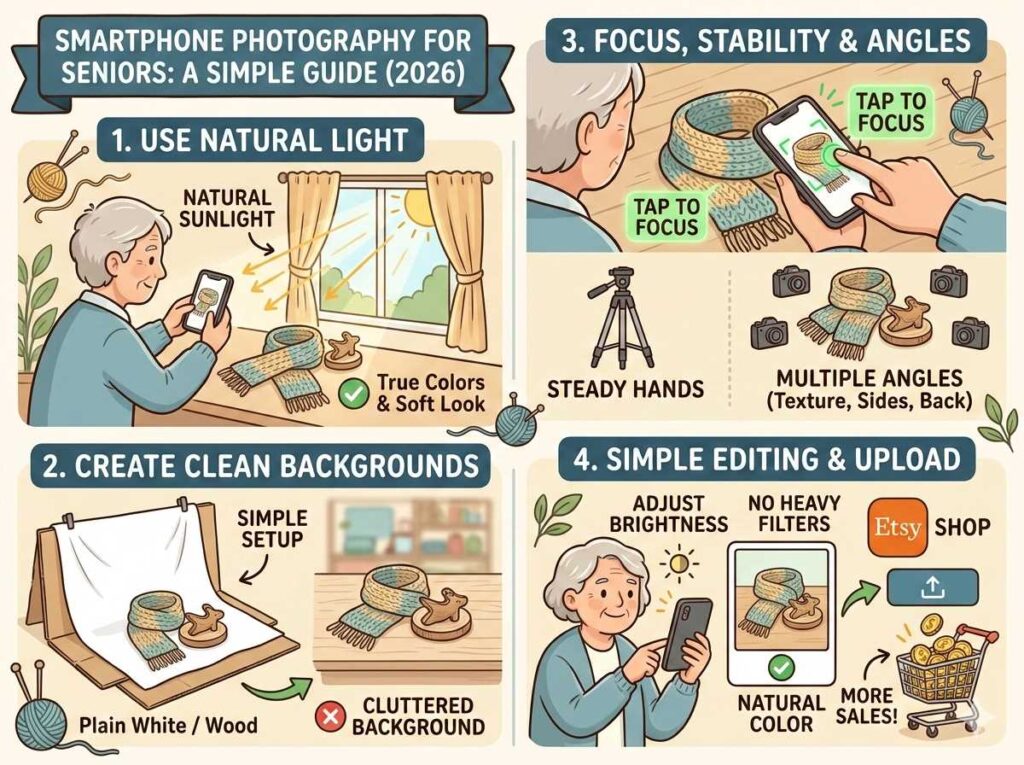
The best and most affordable light source is the one that comes through your window every morning. Place your product on a table or flat surface next to a large window during the daytime. North-facing or east-facing windows tend to give the softest, most even light, especially in the morning hours. Avoid placing your product in direct, harsh midday sunlight — this creates strong shadows that hide the texture of your work.
Natural light does something that artificial bulbs simply cannot: it reveals the true, honest colors of your product. If you are photographing a deep burgundy knitted blanket or a sky-blue ceramic mug, natural light will capture those colors faithfully. Buyers who receive a product that looks exactly like the photo are far more likely to leave positive reviews and return for repeat purchases.
What to Do When Natural Light Is Not Available
On overcast days or during winter evenings, you may need a little help. A simple and affordable solution is to use two daylight-balanced LED desk lamps placed on either side of your product. This technique, called “two-point lighting,” eliminates harsh shadows. You can find suitable LED bulbs with a color temperature of 5000K–6500K at most hardware stores for under $20. Avoid standard warm yellow household bulbs, as they give your photos an unnatural orange tint that is very difficult to correct in editing.
If you would like to see visual examples of professional product lighting setups in action, the product photography tutorials on YouTube are an excellent free resource to bookmark.
Create a Simple and Clean Background
A cluttered background is one of the most common mistakes in product photography for beginners. When a buyer looks at your photo, their eyes should go straight to your product — not to the pile of mail on your kitchen counter or the cat lounging in the corner.
The simplest and most effective backdrop is a clean white surface. Here are some easy options you likely already have at home:
- A large piece of white poster board or cardboard (available at any dollar store)
- A plain white bed sheet laid flat on a table
- A light-coloured wooden cutting board or wooden tray for a warm, natural feel
- A white or light grey wall as your background for larger items
For handmade crafts, neutral backgrounds like white, cream, or light grey tend to work best because they do not compete with the colors of your product. If you sell rustic or farmhouse-style items, a piece of natural wood or burlap fabric can add warmth and context. The key principle remains the same: the background should support your product, not distract from it.
You can also create a simple “sweep” — a continuous curved surface — by taping a large piece of cardboard to a wall and letting it curve gently onto your table. This eliminates the hard line where the wall meets the table and gives your photos a clean, professional studio look entirely for free.
Understanding the Rule of Thirds: Compose Like a Pro
One of the most powerful yet simple composition techniques is called the Rule of Thirds. This is a method used by professional photographers worldwide, and it is built directly into your smartphone camera. Adobe describes it as a guideline that divides the image into nine equal parts using two horizontal and two vertical lines — like a tic-tac-toe board.
Instead of placing your product dead-center in every photo, try positioning it along one of the grid lines or at one of the four intersection points. This creates a sense of visual balance and guides the buyer’s eye naturally across the image. Studies in visual perception show that viewers tend to look at these off-center points first, making your product feel more dynamic and appealing.
How to Turn On the Grid on Your Phone
- iPhone: Go to Settings → Camera → toggle on “Grid”
- Android: Open your Camera app → tap the Settings (gear) icon → look for “Grid Lines” or “Composition Grid” and turn it on
Once you have the grid enabled, you will see it overlaid on your screen as you frame your shot. It does not appear in the final photo — it is only a guide for your eyes while composing. This small change alone can dramatically improve the visual quality of your product listings. Remember, this is a guideline, not a rigid rule. Once you become comfortable with it, you can choose when to follow it and when to intentionally break it for creative effect.
Focus, Stability, and Multiple Angles
Blurry photos immediately destroy buyer trust. Fortunately, preventing blurry images with a smartphone is straightforward once you understand a couple of basic habits that are central to good smartphone photography for seniors.
How to Get Sharp, Clear Focus Every Time
On every modern smartphone, you can lock focus on your subject by simply tapping on it on the screen. When you tap, a small box or circle will appear, indicating where the camera is focused. On iPhone, you will also see a sun icon that allows you to drag and manually adjust brightness at the same time — a very useful combination.
To avoid camera shake, try these simple tricks:
- Rest your elbows on the table surface while shooting
- Lean your back against a wall for additional stability
- Use the volume button on your phone as a shutter button instead of tapping the screen (this reduces hand movement)
- Use your phone’s self-timer (a 2–3 second delay) so the camera can settle before shooting
- Consider a small inexpensive phone tripod — available for under $15 online — for perfectly still shots every time
Why You Need Five or More Angles
Online buyers cannot hold your product in their hands, so your photos must do that work for them. For each item you list, try to shoot from at least five different perspectives:
| Shot Type | What It Shows | Why Buyers Need It |
|---|---|---|
| Front (hero shot) | The main face of the product | First impression — the thumbnail buyers see first |
| Back | Reverse side, seams, labels | Builds trust and shows craftsmanship |
| Close-up / detail | Texture, stitching, material quality | Justifies your price by showing quality |
| Scale shot | Product next to a common object (e.g., a hand or coin) | Helps buyers understand actual size |
| Lifestyle / in-use shot | Product being worn or used in real context | Helps buyers imagine owning the item |
Listings with multiple high-quality images consistently convert at a higher rate than single-photo listings. Take more photos than you think you need — you can always choose the best ones later.
Essential Camera Settings on Your Smartphone
Most seniors worry that phone camera settings are too complicated to understand. The truth is that for product photography, you only need to know about a small handful of settings. Here is a quick, jargon-free breakdown for senior product photography:
| Setting | What It Does | Recommended for Product Photos |
|---|---|---|
| HDR (High Dynamic Range) | Balances bright and dark areas | Turn ON for most product shots |
| Flash | Artificial burst of light | Turn OFF — use natural light instead |
| Grid | Overlay for Rule of Thirds | Turn ON |
| Portrait Mode | Blurs the background (bokeh) | Use only for close-up detail shots |
| Timer | Delayed shutter release | Use 2–3 seconds to avoid camera shake |
| Zoom | Makes subject appear closer | Avoid digital zoom — step closer physically |
One important tip: avoid using the digital zoom on your phone (pinching to zoom in). Digital zoom reduces image quality significantly. Instead, physically move your phone closer to the product for a sharper, cleaner image. If you want to fill the frame with a small detail, move closer rather than zooming in.
If you are also interested in mastering other helpful digital tools to grow your freelance or creative business, our guide to the best AI tools for seniors is a great next read. Understanding how to use technology confidently is one of the most valuable investments you can make in your business right now.
Best Free Editing Apps for Seniors in 2026
Once you have taken your photos, a small amount of editing can make a meaningful difference. The great news is that the most highly recommended app for beginners in 2026 is completely free. You do not need to spend any money to edit your photos professionally. Here is a straightforward comparison of your best options for easy phone photography for retirees:
Snapseed (Free — iPhone & Android)
Snapseed, made by Google, is widely considered the gold standard for free mobile photo editing. PetaPixel calls it one of the best free editing applications available at any price. It is completely free, contains no advertisements, and requires no subscription — making it ideal for seniors who want powerful results without ongoing costs.
Key features useful for product sellers:
- Tune Image: Adjusts brightness, contrast, shadows, and highlights with a simple swipe
- Selective Adjust: Lets you brighten just your product without overexposing the background
- Healing Tool: Removes small distractions like dust or scratches from your backdrop
- Non-destructive editing: Your original photo is never permanently changed — you can always revert
- Stack system: Every edit is saved as a separate layer, so you can go back and adjust individual changes
Adobe Lightroom Mobile (Free Basic Version)
Adobe Lightroom Mobile offers a free tier that is perfectly sufficient for basic product photo editing. It is especially useful if you photograph multiple products in one session, as you can copy your edits from one photo and paste them onto all the others with a single tap — a massive time saver when you have a large inventory to list. The free version handles brightness, color correction, and cropping beautifully.
Your Phone’s Built-In Editor
Do not overlook the free editing tools already built into your phone’s photo gallery. In 2026, the built-in Photos app on both iPhone and Android has become surprisingly powerful. You can adjust brightness, contrast, color warmth, sharpness, and even remove small background distractions without downloading anything at all. For most seniors selling crafts online, the built-in editor may be all you ever need before uploading to your shop.
Editing Tips: Less Is More
When it comes to editing product photos, restraint is your best friend. The goal of editing in smartphone photography for seniors selling handmade goods is accuracy and clarity — not artistic transformation. Here is what to adjust and what to leave alone:
What You SHOULD Adjust
- Brightness/Exposure: If your photo looks slightly dark, lift the brightness a little. Aim for a naturally lit, airy appearance.
- Shadows: Gently lifting the shadows reveals detail in the darker areas of your product — especially useful for dark-colored items like navy yarn or espresso-stained wood.
- Sharpness: A very slight sharpness increase (5–10%) can make the texture of knitted or woven items pop beautifully.
- Straighten and Crop: Make sure your backdrop lines are perfectly horizontal and that the product is framed as intended.
- White Balance: If your photo has an unwanted yellowish or bluish cast, adjust the warmth/temperature slider until the white background looks genuinely white.
What You Should AVOID
- Heavy color filters: Never use Instagram-style filters that dramatically change the color tone. A buyer who orders a “soft pink” hat and receives a “dusty mauve” one will leave a disappointed review.
- Over-sharpening: Too much sharpness creates an artificial, crunchy look that reads as low-quality.
- Excessive brightness: Blowing out highlights loses all the texture detail in light-colored items like white or cream fabrics.
- Heavy vignettes: Dark edges around the photo look outdated and give a gloomy, unprofessional feel.
The most important rule in editing product photos is this: the finished photo should look exactly like what the buyer will receive in the mail. Honest, clear, and beautiful.
Common Mistakes to Avoid in Senior Product Photography
Even with the best intentions, certain habits can undermine otherwise good photos. Here are the most frequent errors seen in online craft listings — and how to fix each one quickly:
Shooting Under Bathroom or Overhead Kitchen Lighting
Overhead artificial lights cast downward shadows that flatten the texture of your product and often give it a yellowish or greenish cast. Always move your setup to a window with natural daylight, or invest in a pair of daylight LED lamps as described earlier. This single change will dramatically transform your photos.
Using the Phone’s Flash
The built-in flash on a smartphone is almost never useful for product photography. It creates harsh, flat light with deep shadows behind the product and often washes out fine details entirely. Keep it turned off and rely on natural or LED lighting instead. This is one of the most impactful single changes you can make in your handmade product photography immediately.
Not Cleaning Your Camera Lens
This is a surprisingly common cause of soft, hazy photos. The lens on your phone lives in your pocket or purse all day and accumulates fingerprints, dust, and natural oils. Before every photo session, simply wipe the lens gently with a clean, soft cloth or even the corner of a cotton T-shirt. This takes ten seconds and can make a noticeable improvement in image clarity.
Only Taking One Photo Per Item
Professional photographers take dozens of shots and choose the best one. Smartphone storage is vast and photos are free — there is no reason to be frugal with your shutter. Take ten or twenty shots from each angle, then choose the sharpest, best-lit one. You will be amazed how much natural variation there is between shots taken just seconds apart.
Forgetting to Show the Scale
A very common source of buyer disappointment is receiving a product that is a different size than they imagined. Always include at least one photo that shows your item in context — being held in a hand, worn on a person, or placed next to a familiar everyday object. This builds buyer confidence and significantly reduces the likelihood of returns or negative feedback.
If you want to continue building your digital skills beyond photography, our guide to digital tools for seniors and our article on making money with Canva are excellent next steps for growing your online presence and brand.
Quick Photo Checklist Before You List
Before uploading any photo to your shop, run through this quick checklist. You may want to print it out and keep it near your photography setup as a handy reminder:
| ✅ Check | What to Look For |
|---|---|
| Lens clean? | No smudges or fingerprints on the camera lens |
| Good lighting? | Natural window light or daylight LED lamps — no harsh shadows |
| Clean background? | No clutter or distracting objects visible in the frame |
| Focus locked? | You tapped the product on screen — the image is sharp |
| Multiple angles? | At least 5 shots: front, back, close-up, scale, lifestyle |
| Colors accurate? | The photo faithfully reflects the true color of the product |
| Editing minimal? | Only brightness and contrast adjusted — no heavy filters applied |
| Straight and cropped? | Photo is level and the product is well-framed |
If you can tick every box on this list, your photos are ready to upload. Remember, the goal is not perfection — it is honesty and clarity. Buyers appreciate photos that are clean, accurate, and show the product from multiple perspectives. You do not need to be a professional photographer to achieve this standard. Consistency and care matter far more than expensive gear.
How Smartphone Photography Connects to Your Bigger Business Picture
Mastering your phone’s camera is just one piece of a larger puzzle. Great photos attract clicks, but you also need the right pricing, engaging product descriptions, and a well-organized shop to turn those clicks into actual sales. Our guide on how to price your handmade items will help you make sure your work is valued fairly. Meanwhile, our article on selling digital products for seniors opens an entirely new income avenue alongside your physical crafts — you can sell patterns, printables, or tutorials as downloadable files with zero shipping costs.
Photography is also a skill that builds naturally on itself. The more you practice, the faster your eye develops. After a few weeks of conscious, intentional shooting, you will find that you no longer need to think consciously about the Rule of Thirds or focus locking — it will simply become second nature. Many seniors who start photographing their crafts for Etsy eventually find themselves offering photography services to other local small businesses, turning a practical skill into yet another income stream.
If you are thinking bigger — perhaps moving beyond a single Etsy shop into broader freelance or consulting work — our Remote Jobs for Seniors Ultimate Guide lays out dozens of opportunities that are well-suited to people with your life experience and creative skills. You might also enjoy our best AI tools for senior freelancers guide, which covers how artificial intelligence can save you hours of work each week on tasks like writing product descriptions, managing your shop, and handling customer inquiries.
And if you feel ready to invest a little more time in your digital skills, our practical guide to using ChatGPT for seniors can show you how to write better product listings in minutes — a perfect companion to your newfound photography skills.
Conclusion
Mastering smartphone photography for seniors is an achievable goal that pays real dividends in your online sales. You do not need an expensive camera, a professional studio, or any prior photography experience. All you need is a clean window, a plain background, a steady hand, and the willingness to take a few extra shots until you get it right.
Start simple: set up next to your best window, lay your product on a white surface, tap the screen to lock focus, and take ten shots. Then open Snapseed (free to download), gently adjust the brightness if needed, and upload your best image. That is genuinely all it takes to get started with phone camera tips for older adults who are selling crafts online.
Your craftsmanship deserves to be seen clearly and beautifully. With a little consistent practice, your photos will continue to improve — and so will your sales. If you are ready to take the next step in growing your online business, do not forget to explore our full library of resources for seniors building meaningful income in 2026. Every great journey begins with a single photo.
Looking for more opportunities? Check out our Remote Jobs for Seniors Ultimate Guide for a complete list of ways to earn from home in 2026.
FAQ: Mastering Smartphone Photography for Seniors
Not at all. Modern devices are designed with intuitive interfaces, making smartphone photography for seniors more accessible than ever. With just a few basic adjustments to your settings, you can start capturing professional-quality images immediately.
The most vital tip is to ensure your lens is clean and to use natural light whenever possible. Focusing on these simple habits is the foundation of successful smartphone photography for seniors, as it drastically improves clarity and color balance.
You don’t need to spend a lot of money. While a basic tripod can help, the beauty of smartphone photography for seniors lies in its simplicity—using the tools you already have in your pocket to create art.
Absolutely. Many older adults are now selling their high-quality photos on stock image websites. By mastering smartphone photography for seniors, you can turn your daily walks or travel experiences into a source of extra income.
In 2026, AI automatically adjusts exposure and focus. This technology simplifies smartphone photography for seniors by doing the technical “heavy lifting,” allowing you to focus entirely on the composition of your shot.
Our guide is a great start, but joining online communities or local workshops focused on smartphone photography for seniors is a wonderful way to keep practicing and sharing your best work with others.