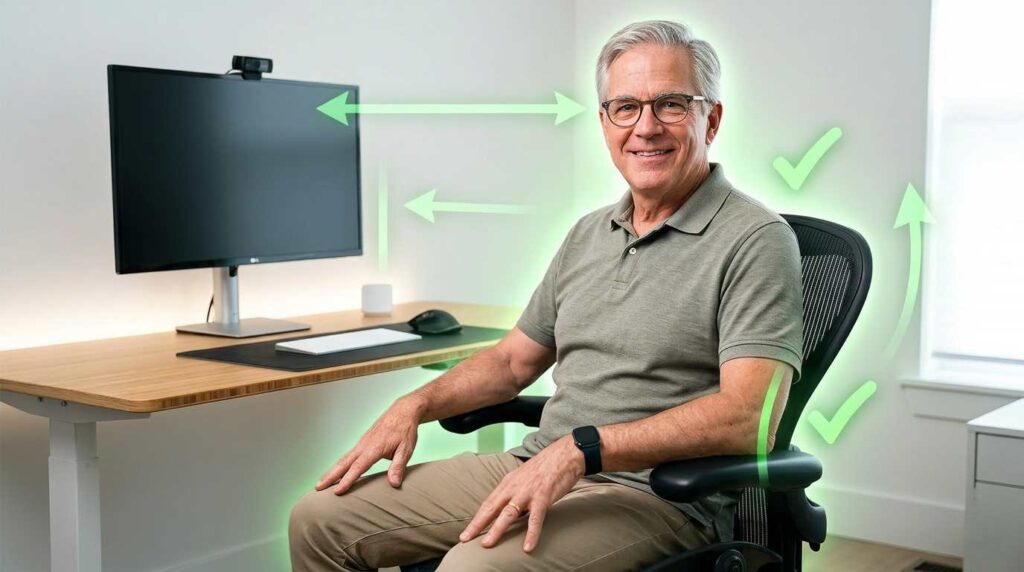
If you’ve ever stood up after three hours at your desk and felt your lower back quietly protest, this guide is for you. Building the right ergonomic home office setup for seniors isn’t about buying expensive furniture — it’s about making five or six smart, specific adjustments that protect your body for the long haul. Every tip below is explained in plain English, no tech background required.
📋 What You’ll Learn
- Why your body needs a different setup after 55
- Choosing the right ergonomic chair
- Desk height and sit-stand options
- Monitor position and eye strain
- Lighting that won’t tire your eyes
- Keyboard, mouse and wrist care
- Organizing your space for safety
- A daily movement routine (5 minutes)
- Frequently asked questions
1. Why Your Body Needs a Different Setup After 55
Your body at 60 is not your body at 35 — and that is a fact, not a complaint. After 55, bone density gradually decreases, the discs between your vertebrae lose some of their cushioning fluid, and your eyes need more light to focus on the same text. A standard office chair or a kitchen table that worked fine twenty years ago can now cause real, lasting damage if you sit there for hours every day.
The good news: these changes are predictable, which means the solutions are also predictable. An ergonomic home office setup for seniors works by putting every piece of your workspace in exactly the position that keeps your body in its natural, relaxed alignment — no awkward angles, no reaching, no craning your neck.
According to the Bureau of Labor Statistics, workers aged 55 to 64 account for a growing share of remote and freelance employment in the United States. That means more of us are spending serious hours at home desks — and the physical cost of a bad setup adds up fast.
Quick reality check: A 2024 study published in the Journal of Occupational Health found that adults over 55 who made even three ergonomic adjustments to their workstations reported a 40% reduction in daily musculoskeletal discomfort within 30 days. Three adjustments. Thirty days. That’s worth five minutes of your time right now.
2. The Chair: Your Most Important Investment
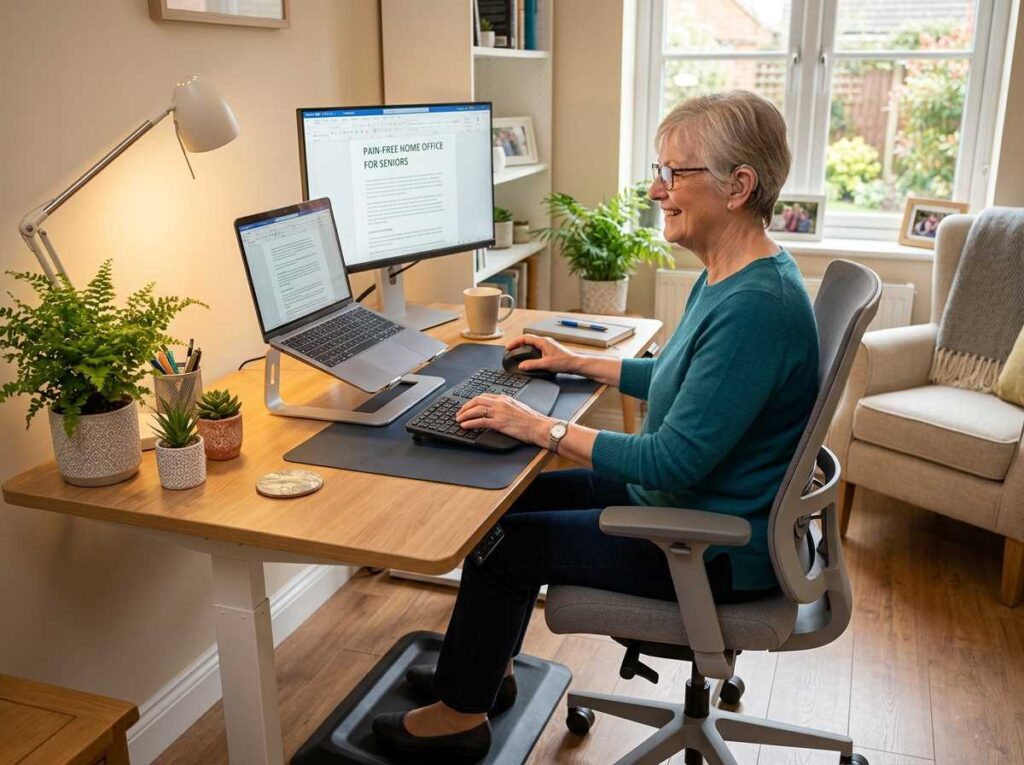
Think of your chair the way you’d think of a good pair of shoes for a long hike. The wrong pair ruins the whole trip. The right pair, and you barely notice your feet. When it comes to your ergonomic home office setup for seniors, the chair is where most people go wrong — and where you can make the biggest improvement for the least money.
What to look for — in plain terms
- Lumbar support: This is the curved part of the backrest that pushes gently against the small of your back (just above your belt line). Without it, you’ll slump forward within an hour. With it, your spine stays in its natural S-curve all day.
- Adjustable seat height: Your feet must rest completely flat on the floor. If they dangle, your circulation suffers. If your chair is too low, your hips rotate forward painfully. Most chairs adjust by a lever under the right side of the seat.
- Adjustable armrests: Your elbows should rest lightly on the armrests at the same height as your desk surface. If you’re reaching up or dropping down, that tension travels right into your neck and shoulders.
- Seat depth: Sit all the way back. You should have about two fingers of space between the front edge of the seat and the back of your knees. Too little space cuts off circulation to your lower legs.
| What to Check | Correct Position | Why It Matters |
|---|---|---|
| Seat height | Feet flat on floor, knees at 90° | Reduces hip and lower-back pressure |
| Lumbar support | Gently pressing the small of the back | Prevents disc compression and slouching |
| Armrest height | Level with desk surface | Eliminates neck and shoulder tension |
| Seat depth | 2 fingers between seat edge and knee | Maintains healthy circulation to legs |
| Backrest angle | Slightly reclined (100–110°) | Reduces spinal load by up to 30% |
One thing to avoid: Gaming chairs. They look impressive but are designed for short bursts of intense focus, not sustained working hours. They typically lack true lumbar support and encourage leaning back in ways that strain your lower back over time. Stick with task chairs from brands like Herman Miller, Steelcase, or even mid-range options like the Flexispot Soutien.
Don’t have the budget for a new chair right now? A good lumbar cushion (around $25–$40) placed at the small of your back can turn almost any chair into a temporary solution. It’s not permanent, but it works while you plan the bigger upgrade. Learn more about setting up your full digital wellness and ergonomics strategy for a sustainable remote career.

3. Your Desk: Height Is Everything
The right desk height lets your arms rest naturally at your sides, elbows bent at 90 degrees, wrists straight as you type. When your desk is too high, your shoulders rise up toward your ears — and stay there for hours. When it’s too low, you hunch forward. Either way, your neck pays the price.
How to find your ideal desk height in 30 seconds
- Step 1: Sit in your chair with correct posture — back straight, feet flat on floor.
- Step 2: Let your arms hang naturally at your sides, elbows bent at 90 degrees.
- Step 3: The height of your elbows is your ideal desk height. Measure from floor to elbow.
- Step 4: For most adults, that’s between 28 and 30 inches. Shorter adults may need 26 to 28 inches.
Should you get a sit-stand desk?
If you work more than three hours a day at your desk, a height-adjustable (sit-stand) desk is one of the best investments you can make. Here’s why it matters specifically for people over 55: prolonged sitting slows blood flow to the legs, increases pressure on spinal discs, and triggers that familiar afternoon brain fog. Switching to standing for even 15 minutes every hour reverses all of those effects.
You don’t need to stand all day — that creates its own problems. The research-backed sweet spot is roughly 60% sitting and 40% standing, shifting every 30 to 45 minutes. A simple electric desk like the Flexispot E7 or the FEZIBO standing desk makes this effortless: you save your preferred heights as presets, press a button, and you’re up. No lifting, no cranking, no fuss.
| Time Block | Position | Activity |
|---|---|---|
| 0–30 min | Sitting | Email, reading, focused writing |
| 30–45 min | Standing | Video calls, light tasks, reviewing documents |
| 45–50 min | Short break | Walk around, stretch, refill water |
| Repeat | — | Maintain this rhythm throughout the day |
For a deeper look at pairing your desk routine with a productive daily schedule, see our guide on creating a sustainable work-from-home schedule for seniors.
4. Monitor Position: The Secret to a Pain-Free Neck
This is one of the most overlooked parts of any ergonomic home office setup for seniors, and one of the most impactful. The average human head weighs about 10 to 12 pounds. When you tilt it forward just 15 degrees — which is what happens when your screen is too low — the effective stress on your cervical spine jumps to the equivalent of carrying a 27-pound weight around your neck all day. For hours. Every day.
The right screen position, step by step
- ✅ The top edge of your screen should be at or slightly below eye level — never above it.
- ✅ The screen should be 20 to 30 inches from your face (roughly arm’s length when you extend your hand).
- ✅ Tilt the screen back slightly (10–20 degrees) so you’re looking down at a gentle angle — this is natural for the eyes.
- ✅ If you use a laptop, the screen will almost always be too low. A monitor stand or monitor arm + external keyboard solves this completely.
- ✅ Increase your font size to at least 125% in your system settings. Small text causes you to lean forward, which undoes all of the above.
One monitor or two?
If your work involves comparing documents, researching while writing, or managing multiple windows, a second monitor can genuinely reduce strain. Instead of rapidly switching between tabs (which triggers tiny repeated head movements), your eyes smoothly scan left to right. Place the primary monitor directly in front of you and the secondary monitor to the side at a slight angle. The right tech setup for senior consultants covers this in more detail if you work with clients regularly.
5. Lighting: Your Eyes Deserve Better Than a Single Overhead Bulb
After age 40, the lenses in your eyes start to yellow and thicken — completely normal, but it means you need significantly more light to see the same level of detail. By 60, you may need three to four times more light than you did at 30. That single overhead lightbulb that’s served you fine for years is now working against you.

The right lighting mix for a senior home office
- Natural light first: Position your desk so windows are to the side (not directly behind or in front of you). Natural light is the best light, but glare on your screen will tire your eyes faster than anything else.
- A dedicated task lamp: Place it on the side opposite your writing hand (right of the desk if you’re left-handed, left if you’re right-handed). This eliminates shadows on your work. Look for a lamp with brightness control — you’ll want it brighter for detailed reading, softer for video calls.
- Color temperature matters: Bulbs labeled 3000K–4000K produce warm-to-neutral white light, which is easy on aging eyes. Avoid “daylight” bulbs (5000K+) in the evening — the blue light signals your brain to stay awake and disrupts sleep.
- Anti-glare screen filter: A simple matte screen filter (under $20 on Amazon) eliminates the reflections that cause you to squint and strain.
The 20-20-20 Rule — recommended by the American Optometric Association: Every 20 minutes, look at something 20 feet away for 20 seconds. It sounds almost too simple, but it fully relaxes the focusing muscles in your eyes. Set a phone alarm if you need to.
6. Keyboard, Mouse, and Wrist Care — Small Tools, Big Difference
The average knowledge worker types 40 words per minute for several hours a day. That’s thousands of individual finger movements. If your wrists are bent or your mouse is forcing your arm into an awkward angle, every one of those movements adds a tiny amount of strain to the tendons and joints of your hands. Over months and years, that accumulates into real pain.
For seniors, this matters more than for younger workers because tendons heal more slowly and arthritis is more common. The goal is to keep your wrists completely straight — flat and neutral — throughout your entire workday.
| Item | Standard Option | Senior-Friendly Alternative | Why It Helps |
|---|---|---|---|
| Mouse | Flat laser mouse | Vertical mouse or trackball | Keeps forearm in natural handshake position; eliminates wrist rotation |
| Keyboard | Slim laptop-style | Full-size with large keys, or split keyboard | Reduces reach and finger stretching; larger targets mean fewer errors |
| Wrist support | None | Gel wrist rest | Keeps wrists elevated and straight during typing pauses |
| Monitor | Built-in laptop screen | 27-inch external monitor on an adjustable arm | Screen at correct height; larger text reduces squinting |
| Footrest | Floor/nothing | Adjustable angled footrest | Supports feet when desk height can’t go lower; relieves thigh pressure |
A note on voice control
If you’re managing arthritis in your hands, voice-to-text technology in 2026 is genuinely excellent — and free. Windows Voice Typing (Win + H) and Apple Dictation both transcribe speech accurately enough for real work. Many seniors find that dictating emails and documents cuts their keyboard time in half, which dramatically reduces daily hand and wrist fatigue. If you’re curious about using AI tools to work even more efficiently, explore our guide to the best AI tools for seniors working from home.
7. Organizing Your Space for Safety — Falls Prevention Starts at Your Desk
Falls are the leading cause of injury-related hospital visits for adults over 65 in the United States, according to the CDC. And most of them happen at home. A cluttered office with cables snaking across the floor, a loose rug, or a printer shoved into an awkward corner is an accident waiting to happen — especially if you’re getting up quickly to answer the phone or rushing between rooms.
The five-minute office safety audit
- Step 1: Tape down all cables or run them through cable sleeves that lie flat against the wall. A single power cord across a walkway is enough to cause a serious fall.
- Step 2: Check every rug in your office for non-slip backing. If it slides even slightly, remove it or buy a non-slip mat to go underneath.
- Step 3: Create a clear path of at least 36 inches from your desk to the door. You should be able to walk out quickly without turning sideways or stepping over anything.
- Step 4: Set up a “reach zone”: Keep everything you use daily (phone, water bottle, notepad, pen) within arm’s reach without leaning or twisting. Reaching across a large desk is a common cause of rotator cuff strain in older adults.
- Step 5: Good lighting near the floor: A small nightlight or LED strip at baseboard level makes it easier to see cables and obstacles when you’re working in the evening.
8. A 5-Minute Daily Movement Routine for Home Office Workers
No ergonomic setup eliminates the need to move. Muscles that stay still tighten. Joints that don’t rotate stiffen. The goal is to build micro-movement into your workday so naturally that it becomes automatic. Here’s a simple five-minute routine you can do right at your desk, no equipment needed.
Do this once every hour
- Neck rolls (1 minute): Slowly drop your chin to your chest, roll your head gently to the right, back to center, then left. Five slow circles each direction. This releases the tension that builds up in the muscles supporting your head.
- Shoulder shrugs (30 seconds): Lift both shoulders toward your ears, hold for three seconds, release. Repeat six times. You may feel actual clicks or pops as tight muscles let go — that’s normal.
- Wrist circles (30 seconds): Extend both arms in front of you. Slowly rotate both wrists in full circles — ten forward, ten backward. This keeps the tendons and joint fluid healthy.
- Stand and walk (2 minutes): Get up. Walk to another room, refill your water glass, look out a window. Simply standing and walking for two minutes every hour reduces the negative cardiovascular effects of prolonged sitting by a significant margin.
- Back stretch (1 minute): Stand, place hands on lower back, gently arch backward until you feel a mild stretch. Hold five seconds. This counteracts the forward bend that builds up from leaning toward a screen.
For a more comprehensive movement plan designed around the senior body, our full guide on morning exercises for seniors pairs well with this routine. Combine both and you have a complete physical self-care system for remote workers.
Ready to Put This Into Practice?
Discover how a well-organized workspace connects to a more productive, more profitable remote career — whether you’re freelancing, consulting, or exploring new opportunities after 55.
Your Complete Ergonomic Home Office Setup Checklist for Seniors
Use this as your master reference. Print it out and check each item off as you adjust your workspace.
| Category | What to Do | Priority |
|---|---|---|
| Chair | Set height so feet are flat, knees at 90° | ⭐ High |
| Chair | Adjust lumbar support to press gently against lower back | ⭐ High |
| Chair | Set armrests level with desk surface | ⭐ High |
| Desk | Adjust height to match elbow level when sitting | ⭐ High |
| Monitor | Top edge at or just below eye level | ⭐ High |
| Monitor | 20–30 inches from face | ⭐ High |
| Lighting | Add a task lamp on opposite side from writing hand | Medium |
| Lighting | Switch to 3000–4000K bulbs | Medium |
| Mouse | Switch to vertical mouse or trackball | Medium |
| Keyboard | Add gel wrist rest; consider large-key keyboard | Medium |
| Safety | Tape down all cables; check rugs for non-slip backing | ⭐ High |
| Routine | Stand and move for 2–5 minutes every hour | ⭐ High |
| Screen | Increase system font size to 125–150% | Medium |
| Eyes | Practice 20-20-20 rule every 20 minutes | Medium |
Frequently Asked Questions — Ergonomic Home Office Setup for Seniors
Your chair should be set so your feet rest completely flat on the floor and your knees form a 90-degree angle. For most adults over 55, that means a seat height between 17 and 19 inches. If your feet don’t quite reach the floor, a simple adjustable footrest (around $25) solves the problem instantly without changing your chair.
Position your monitor between 20 and 30 inches from your face — roughly arm’s length away when you extend your hand toward the screen. The top edge of the screen should sit at or just below your eye level so your neck stays in a natural, relaxed position throughout the day.
Yes, but you don’t need to stand all day. Switching between sitting and standing every 30 to 45 minutes keeps blood circulating, reduces lower-back pressure, and fights the afternoon energy slump. Electric height-adjustable desks make the switch effortless — you save your preferred heights as presets and press one button. Entry-level options start around $300.
Combine a warm LED task lamp (3000–4000K color temperature) with natural side lighting. Place the lamp on the side opposite your writing hand to avoid shadows on your work. Follow the 20-20-20 rule: every 20 minutes, look at something 20 feet away for 20 seconds to fully relax your eye’s focusing muscles.
A vertical mouse and a full-size keyboard (or split keyboard) dramatically reduce wrist and finger strain. Add an adjustable monitor arm to get your screen at the perfect height, and a gel wrist rest to keep your wrists straight while typing. These four items together typically cost under $150 and can eliminate most daily hand, wrist, and neck discomfort.
Putting It All Together: Start Small, Feel the Difference Fast
You don’t have to overhaul everything in one afternoon. In fact, the most effective approach is to make one change today, live with it for a few days, and then add the next. Start with your chair — it’s the single biggest lever you have. Then fix your monitor height. Then your lighting. Each step compounds on the last.
The seniors who thrive in remote work aren’t necessarily the ones with the fanciest gear. They’re the ones who’ve taken the time to make their workspace work for their bodies — so they can show up mentally sharp, physically comfortable, and ready to deliver excellent work, day after day.
If you’re building out a complete remote or freelance career and want to understand not just the ergonomic side but also the professional tech side of a home office, take a look at our guide to the best home office tech for senior consultants — it covers webcams, audio, and computing power for client-facing work. And if you’re thinking about how to bring in income to fund these upgrades, our overview of freelancing for seniors is a solid next step.
Your body has supported you for decades of hard work. Now it’s your turn to support it.