
Here’s an uncomfortable truth: in a virtual consulting meeting, the client makes a judgment about your credibility within the first 15 seconds — before you say a word about your experience. They look at your picture quality. Your audio quality is then scrutinized. Ultimately, potential clients notice whether you look like someone who takes their work seriously. The right consulting equipment for seniors isn’t about gadgets. It’s about removing every technical barrier between your decades of expertise and the people who need it.
📋 In This Guide
- The #1 priority: Audio that commands respect
- Webcam: Your digital first impression
- Lighting: The free upgrade most people skip
- Computer power for modern consulting software
- Internet reliability — your insurance policy
- Background and workspace presentation
- Software tools every senior consultant needs
- Budget tiers: starter, professional, elite
- Frequently asked questions
1. Audio: The Most Important Consulting Equipment for Seniors
Before we talk about cameras or lighting, let’s settle something: audio is more important than video. Every time. A study by Harvard Business Review found that poor audio quality causes listeners to rate the speaker as less intelligent, less credible, and less likable — even when the spoken content is identical. Your client’s brain is constantly asking, “Is this person worth listening to?” Bad audio answers that question the wrong way.
For senior consultants, this matters doubly. You’ve spent 30 or 40 years building expertise. Don’t let a $30 laptop microphone — the kind that picks up your refrigerator humming two rooms away — undermine that investment.

OPTION A — USB Desk Microphone
The standalone microphone approach
A dedicated USB microphone sits on your desk, picks up your voice with studio clarity, and plugs directly into your computer — no technical setup required. The Blue Yeti and the Shure MV7+ are the two most recommended options for home consultants.
- Cost: $100–$250
- Setup difficulty: Plug in and it works. Your computer recognizes it automatically.
- Best for: Consultants who want studio-quality audio and don’t mind leaving the mic on their desk during calls.
- Bonus: The same microphone doubles as recording gear if you want to create video content, online courses, or voice narrations — extra income streams that many seniors are building through platforms like Amazon KDP or podcast consulting.
OPTION B — AI Noise-Canceling Headset
The wireless headset approach
A premium wireless headset like the Jabra Evolve2 85 or the Sony WH-1000XM5 uses neural network processing to mathematically remove every sound that isn’t your voice — the dog barking, the neighbor’s lawn mower, your HVAC system. It isolates your voice at the hardware level before it even reaches your computer.
- Cost: $150–$380
- Setup difficulty: Pair via Bluetooth, same as wireless earbuds.
- Best for: Consultants who move around during calls, take calls from multiple rooms, or live in noisy environments.
- Senior-friendly advantage: If you have any hearing differences, many premium headsets allow you to hear your own voice through the speakers — a feature that helps you modulate your volume naturally during calls.
One thing to avoid: Built-in laptop microphones. They’re positioned pointing away from your mouth, designed to minimize background noise by picking up as little as possible, and the audio often sounds thin and echo-filled on the receiving end. Every person on the other end of that call hears a slightly hollow version of your voice.
2. Webcam: Your Digital First Impression
When you meet a client in person, they read your body language, your posture, your handshake. On a video call, they get a small rectangle on their screen. The quality of that rectangle communicates far more than you’d expect. A pixelated, poorly-lit image signals “I don’t quite belong in this professional space.” A sharp, well-lit image signals authority and attention to detail before you’ve said a word.
What “1080p” and “4K” actually mean — in plain English
Resolution numbers describe how much detail the camera captures. Higher numbers mean a sharper, clearer image. For most consulting calls:
- 1080p (Full HD): More than sufficient for all video platforms. Your image will look crisp and professional on any client’s screen.
- 4K: Useful if you do recorded presentations or plan to use video content for marketing. On a live call, most platforms compress 4K down anyway — so it’s rarely a deciding factor for calls alone.
The “AI Auto-Framing” feature — genuinely useful for seniors
Modern webcams from Logitech (the MX Brio 705) and Insta360 include a feature that tracks your movement and keeps you centered automatically. If you lean back, stand up to reference a whiteboard, or shift to look at a second monitor, the camera follows you and reframes the shot. This removes the need to constantly reposition yourself — which is one of those small stressors that distracts from the actual conversation.
| Camera | Resolution | AI Features | Price Range | Best For |
|---|---|---|---|---|
| Logitech C920x | 1080p | Basic auto-exposure | $60–$80 | Budget starting point |
| Logitech MX Brio 705 | 4K / 1080p | Auto-framing, light correction | $170–$200 | Best all-around professional choice |
| Insta360 Link 2 | 4K | AI tracking, gesture control | $200–$250 | Consultants who use whiteboards or move around |
| Smartphone (with app) | Varies | Depends on phone | $0 (use existing phone) | Testing before committing to purchase |
Placement tip: Position your webcam at eye level — not below your face looking up (unflattering and undermines authority), and not above your face looking down (makes you look small). At eye level, direct eye contact feels natural and confident. A small stack of books under your laptop achieves this for free while you decide on a permanent solution.
3. Lighting: The Free Upgrade Most Senior Consultants Skip
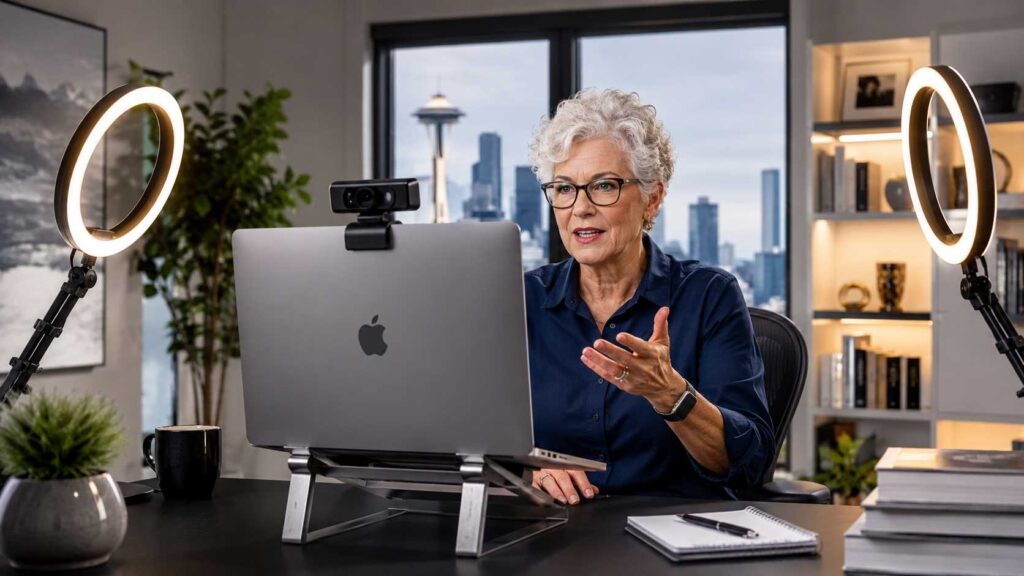
Here is the single most impactful thing you can do right now without spending a dollar: move your desk so that a window faces you. Natural light hitting your face from the front is genuinely better than any professional lighting kit costing hundreds of dollars. If a window is behind you, you appear as a dark silhouette. In front of you, you look bright, warm, and alive.
But natural light isn’t always available — you can’t reschedule a 7 AM client call until the afternoon sun cooperates. That’s where dedicated lighting comes in.
Three lighting setups, from simple to professional
LEVEL 1 — Simple ($30–$60)
The ring light
A 12-inch LED ring light on an adjustable arm, positioned just behind and above your screen, provides even, shadow-free illumination of your face. It makes you look awake, removes under-eye shadows, and adds a subtle catchlight (a small bright reflection in your eyes) that makes eye contact feel more alive and engaged on camera.
Look for a ring light with adjustable color temperature (warm to cool) and adjustable brightness. The warm setting (around 3200K) tends to be most flattering for most skin tones.
LEVEL 2 — Professional ($80–$180)
Key light + fill light
This is the same basic setup used by professional broadcast journalists. A key light (your main, brighter light) is positioned 45 degrees to one side of your face. A softer fill light on the opposite side eliminates harsh shadows. Together they create a three-dimensional, warm, professional look that communicates “I take this seriously.”
Elgato’s Key Light Mini and the Lume Cube Panel Mini are popular, easy-to-set-up options for home offices.
LEVEL 3 — Studio ($200+)
Full studio setup
If you run group consulting sessions, record video courses, or host webinars for large audiences, a full softbox or LED panel setup is worth the investment. This level of lighting is genuinely broadcast quality — the same gear used in television studios, adapted for home use. But unless you’re regularly producing video content, it’s overkill for standard consulting calls.
4. Computing Power: Running 2026 Consulting Software Without Frustration
You don’t need a gaming computer. But you do need a machine that doesn’t freeze, lag, or struggle when you’re simultaneously running a video call, sharing your screen, and using an AI tool to take notes or summarize the meeting. That kind of multitasking used to require serious hardware. In 2026, it requires a reasonably modern machine with one key specification.
The one spec that matters most: RAM
RAM (Random Access Memory — think of it as your computer’s “short-term working space”) determines how many things your computer can handle simultaneously without slowing down. Here’s what you actually need as a senior consultant:
| RAM Amount | What It Handles | Recommendation |
|---|---|---|
| 8 GB | Basic email, documents, light browsing | Too limited for modern consulting work |
| 16 GB | Video calls + documents + AI tools simultaneously | ✅ Minimum for professional use |
| 32 GB | Video calls + screen sharing + local AI + multiple large files | ✅ Ideal for heavy users |
If you’re considering a new machine, both the Apple MacBook Pro (M-series chips) and Windows laptops with Intel Core Ultra or AMD Ryzen AI processors include built-in NPUs (Neural Processing Units) — dedicated chips that handle AI tasks like noise cancellation, background blurring, and real-time transcription without taxing your main processor. These machines run AI tools significantly more smoothly.
If you’re using a tablet for more mobile consulting work, our guide to the best tablets for seniors in 2026 covers which models support the software senior consultants rely on most.
5. Internet Reliability: Your Professional Insurance Policy
Dropping out of a video call mid-sentence during a critical client conversation is one of those small moments that lingers. The client remembers it. They might not hold it against you consciously, but it registers as friction — and consultants live and die by the frictionlessness of working with them. Reliable internet is not optional equipment for a senior consultant. It’s table stakes.
What speed you actually need
- Minimum for one 1080p video call: 10 Mbps upload speed
- Comfortable for calls + screen sharing + AI tools: 25+ Mbps upload
- Check your current upload speed right now: Go to fast.com and click “Show More Info.” The upload number is what matters for your outgoing video quality.
The wired vs. wireless question
WiFi is convenient. A wired ethernet connection (a cable plugged directly from your router into your computer) is dramatically more stable. Even if your internet is theoretically fast enough, WiFi can fluctuate as other devices compete for bandwidth — your neighbor’s Netflix, your phone updating apps in the background, a smart TV downloading a software update. A wired connection eliminates all of that variability. If your laptop doesn’t have an ethernet port, a USB-to-ethernet adapter costs under $25 and solves the problem completely.
The redundancy plan — think of it as a backup generator
Every senior consultant managing premium client relationships needs what virtual project managers call a “redundancy plan.” If your primary internet fails during a board-level call, you need an automatic fallback. The simplest version:
- 1 Keep your smartphone charged before every important call.
- 2 Enable your phone’s mobile hotspot in advance (Settings → Personal Hotspot on iPhone; Settings → Network → Hotspot on Android).
- 3 Test it once so you know it works. Takes 60 seconds.
- 4 If your primary internet drops, switch your laptop’s WiFi connection to your phone hotspot in under 30 seconds.
- 5 Resume the call. Your client may not even notice the brief pause.
This is a core principle in professional virtual project management — always have a fallback, and never let a technology failure become a credibility failure.
6. Your Background: What Clients See Behind You
This one costs nothing and makes a surprising difference. Your background is the visual context your clients use to understand who you are — before you introduce yourself. A cluttered background full of household items signals disorganization. A carefully arranged bookshelf, a clean wall, or even a quality virtual background signals professionalism and intentionality.
The three background approaches that work
- Real bookshelf or organized wall: Books, certificates, a plant, or tasteful artwork. Keep it clean and uncluttered. This is the most credibility-building option because it’s real — clients respond to authenticity.
- Single-color wall (white, gray, navy): A clean wall is better than a cluttered one. Paint one wall in your home office a neutral color if needed — it’s a one-afternoon project that pays for itself in client confidence.
- Virtual background (AI blur or image): Most modern video platforms (Zoom, Teams, Google Meet) offer background blur and virtual backgrounds. AI-powered blur works well on good webcams. Use it when your actual background isn’t ideal — but test it first, because lower-quality webcams sometimes create awkward edges around your head.
The “depth” trick: Position yourself a foot or two in front of your background rather than right up against a wall. This creates visual depth that looks more cinematic and professional on camera. Add a soft light behind you — a small lamp or LED strip aimed at the wall — and you’ll create a glowing background effect that broadcasting professionals call a “backlight.”
7. Software Tools Every Senior Consultant Needs
Hardware gets most of the attention, but the software you run on top of it determines how efficiently you can actually consult. Here are the tools that senior consultants use most in 2026 — explained simply, with no assumption of prior experience.
| Tool | What It Does | Cost | Skill Level Required |
|---|---|---|---|
| Zoom / Google Meet | Video calls — the industry standard | Free (basic) / $15/mo (Pro) | Beginner |
| Otter.ai | Automatically transcribes your calls — creates written notes instantly | Free / $16.99/mo | Beginner |
| Calendly | Lets clients book time on your calendar automatically — no back-and-forth emails | Free / $10/mo | Beginner |
| Claude AI or ChatGPT | Drafts proposals, summarizes research, prepares talking points | Free / $20/mo | Beginner |
| DocuSign | Clients sign contracts electronically — professional and legally binding | $15/mo | Beginner |
| Loom | Record short video messages to send clients instead of long emails | Free / $12.50/mo | Beginner |
The AI tools in particular are transforming what’s possible for senior consultants. Using Claude AI to draft a consulting proposal in 10 minutes — then refining it with your professional expertise — is a workflow that wasn’t available five years ago. It’s a genuine competitive advantage for seniors who adopt it. Our full guide on AI tools for senior consultants covers each platform in depth.
8. Budget Guide: Three Tiers of Consulting Equipment for Seniors
You don’t have to buy everything at once. Start where you can and upgrade as your consulting income grows. Here’s how to think about it in tiers:
| Tier | Total Budget | Key Equipment | Best For |
|---|---|---|---|
| Starter | $100–$250 | Ring light + USB microphone (Blue Snowball) + webcam stand for phone | Testing the consulting waters; first 1–3 clients |
| Professional | $400–$800 | Logitech MX Brio 705 webcam + Blue Yeti X or Shure MV7+ mic + Elgato key light + wired ethernet adapter | Regular client calls; presenting to corporate teams |
| Elite | $1,000–$2,000 | 4K AI webcam + full key/fill lighting kit + NPU laptop (32GB RAM) + professional headset + dedicated backup internet | High-ticket consulting ($5,000+/month); recorded content creation |
If you’re wondering how to fund equipment upgrades while you’re building your practice, our article on the best AI side hustles for seniors covers several entry-level income streams that can generate $500–$1,500 per month with minimal startup costs. Many seniors use these side streams specifically to reinvest in professional equipment.
And remember: any equipment purchased exclusively for business use is generally a deductible business expense on your federal taxes. Keep your receipts. For details on how this works for freelance and consulting income, see our guide on tax tips for senior freelancers.
Ready to Build Your Consulting Practice?
Equipment is just the beginning. Discover how to attract your first high-value clients, price your expertise, and build a consulting business that works around your life — not the other way around.
Three Free Improvements You Can Make Before Your Next Call
Not every upgrade requires spending money. Before your next client call, try these three changes that cost exactly nothing:
- 1 Move toward a window. Sit so the window faces you, not your back. Natural front-facing light will make you look better on camera than any ring light.
- 2 Switch to wired internet. Plug an ethernet cable from your router to your computer. If your computer doesn’t have an ethernet port, a USB adapter costs $20 and the call quality difference is often remarkable.
- 3 Enable noise suppression in your video app. In Zoom: Settings → Audio → Noise Suppression → High. In Google Meet: Settings → Audio → Noise Cancellation → On. This filters out most background noise using software, at zero cost.
Frequently Asked Questions — Consulting Equipment for Seniors
Your microphone, without question. Clients forgive a slightly imperfect picture far more easily than muffled or echo-filled audio. If they can’t clearly hear and understand you, they unconsciously question your competence — unfairly, but consistently. A dedicated USB microphone or AI noise-canceling headset makes the single biggest improvement to how clients perceive your professionalism.
A solid, professional consulting setup costs between $400 and $800, depending on what you already own. Prioritize: microphone first ($80–$200), then webcam ($100–$200), then lighting ($50–$120), then connectivity upgrades. One $5,000 consulting contract pays for all of it many times over — and the equipment is tax-deductible as a business expense.
Yes, in a pinch. Apps like Continuity Camera (Apple) or DroidCam (Android) turn your smartphone into a webcam — and modern smartphone cameras are genuinely excellent. Your phone needs to be still (mount it on a tripod or stand at eye level), fully charged, and on Do Not Disturb mode. For regular client calls, a dedicated webcam is more reliable and removes one variable from your setup.
For a single 1080p video call, you need at least 10 Mbps upload speed. For 4K video or multiple simultaneous calls, aim for 25+ Mbps upload. Check your current speed at fast.com and click “Show More Info” to see your upload number. Upload speed — not download — is what determines your outgoing video quality.
Three free changes that work immediately: (1) Sit facing a window — natural front-facing light is better than most artificial lighting. (2) Plug in an ethernet cable if you have one — wired internet is more stable than WiFi. (3) Enable noise suppression in your video app’s audio settings — this is built into Zoom, Teams, and Google Meet and removes most background sound automatically.
Your Expertise Deserves a Professional Stage
The consulting equipment for seniors that truly matters isn’t the most expensive gear or the flashiest gadgets. It’s the specific combination of audio, video, lighting, and connectivity that removes every technical obstacle between your knowledge and your clients’ needs. When those pieces are in place, your decades of experience can shine through without interference.
Start with your audio. Then your camera. Then your lighting. Each step makes the previous ones more effective. And at every stage, remember that you’re not competing with younger consultants on energy or enthusiasm — you’re competing on depth of expertise, judgment, and the kind of professional presence that only comes with experience. The right equipment simply makes that presence visible.
If you haven’t yet addressed the physical side of your workspace — chair, desk height, monitor position — that guide runs parallel to this one and completes the picture. See our article on ergonomic home office setup for seniors for everything your body needs to work comfortably all day. Together, the two guides give you a workspace that supports both your physical health and your professional performance.
Ready to start bringing in clients to fill that consulting space? Our guide on how to get your first consulting client as a senior covers the practical steps that work fastest for professionals over 55.
External References
Last reviewed and updated: May 12, 2026 by the SeniorGig Team.