

Freelancing for seniors is one of the fastest-growing income strategies for Americans over 50 — and for good reason. According to the AARP Foundation’s Freelancing Resource Center, more than 37% of all freelance workers in the U.S. are now over 55. If you have decades of professional experience and want flexible income without a boss, a commute, or a rigid schedule, freelancing may be the most practical move you can make in 2026.
This guide covers everything you need: the best job categories for experienced professionals, how to set your rates, which platforms to use, how to find high-paying clients, and how to protect your health while working from home. Whether you’re starting from scratch or want to turn existing skills into real income, you’ll find actionable steps here — not vague advice.
- ⚡ Quick Navigation
- Why Freelancing Works After 50
- Best Job Categories
- Step-by-Step Starter Guide
- Rates & Pricing
- Best Platforms
- Finding High-Paying Clients
- AI Tools
- Health & Ergonomics
- Common Mistakes
- FAQ
Why Freelancing for Seniors Works Better Than Ever in 2026
The gig economy has matured significantly. In 2026, clients aren’t just looking for cheap labor — they’re looking for reliability, expertise, and judgment. These are precisely what experienced professionals bring to the table.
Here’s what makes this moment particularly well-timed for seniors:
- AI tools have leveled the playing field. Seniors who learn to use tools like ChatGPT, Claude, or Notion AI can produce work at the same speed as much younger freelancers — while bringing far deeper domain knowledge. Our guide to making money with AI for seniors covers exactly how to do this.
- Remote work is now the default. Many companies have permanently shifted to distributed teams, meaning location is no longer a barrier for experienced professionals.
- Age discrimination is harder online. On platforms like Upwork or Fiverr, your profile, reviews, and work samples speak louder than your resume date.
- Demand for experienced consultants is growing. The U.S. Bureau of Labor Statistics projects management consulting roles to grow 11% through 2033 — faster than average.
- Social Security flexibility. If you’re already collecting benefits, freelancing income can supplement without eliminating them — though there are rules. See our guide on earning income while on Social Security for details.
If you’re coming from a corporate background and wondering what the transition looks like, our career transition after 50 guide covers the mindset shift in detail.
Best Freelancing Jobs for Seniors in 2026
Not all freelance work is equal. The categories below have high demand, reasonable barriers to entry for experienced professionals, and strong hourly rates. You don’t need to master all of them — focus on the one or two that best match your background.
1. Writing, Editing, and Content Strategy
Content creation remains one of the most accessible freelance paths for seniors. If you can write clearly and understand a professional audience, there is consistent demand — especially in healthcare, legal, financial, and B2B sectors, where younger writers often lack the credibility to produce authoritative content.
A growing subset of this category is AI content editing — reviewing and refining content produced by AI tools before it goes to publication. Rates for this work typically start at $35/hour and rise quickly for specialists.
2. Virtual Assistance
Virtual assistants handle scheduling, email management, research, data entry, and administrative coordination. This is one of the lowest-barrier entry points into freelancing — if you’ve worked in any administrative, executive support, or project coordination role, you already have the core skills.
For a full breakdown of how to position yourself and what to charge, see our virtual assistant guide for seniors.
3. Business Consulting and Advisory Work
If you have 20 or more years in a specific industry, you have knowledge that companies genuinely struggle to find or afford on a full-time basis. Fractional consulting — working with 2–4 clients part-time instead of one employer full-time — is one of the highest-earning paths available to experienced seniors.
This is a bigger topic than most freelancing articles cover properly. We’ve built a full roadmap for it, starting with how to start consulting as a senior, through choosing your consulting niche, to high-ticket consulting strategy.
4. Online Tutoring and Teaching
Platforms like Teachable, Udemy, and direct coaching arrangements are strong options if you have teachable expertise — whether that’s professional skills, language instruction, music, academic subjects, or practical life skills. The advantage for seniors: students specifically seek out instructors with real-world experience, not just textbook knowledge.
See our online tutoring guide for seniors and our walkthrough of using Teachable to build a course.
5. AI-Assisted Freelance Work
This is the fastest-growing category for seniors in 2026. Roles include AI content reviewing, AI prompt engineering, training data writing, and AI-assisted transcription. None of these require a technical background — they require judgment, attention to detail, and domain expertise. Our AI prompt engineering guide for seniors and AI transcription earning guide cover the practical starting points.
6. Bookkeeping and Financial Administration
If you have a background in accounting, finance, or business administration, bookkeeping from home is highly paid and consistently in demand. Small businesses routinely need part-time bookkeeping support but can’t justify a full-time hire. Our bookkeeping from home guide for seniors covers certification, tools, and where to find clients.
7. Creative and Digital Products
Seniors with artistic, design, or craft skills can monetize them directly through platforms like Etsy, Gumroad, or print-on-demand services. This category includes handmade items, digital downloads, templates, and more. See our guides on opening an Etsy shop, print-on-demand for seniors, and using Gumroad to sell digital products.
How to Start Freelancing After 50: A Realistic Step-by-Step Guide

Most guides jump straight to “sign up and start applying.” That almost guarantees frustration. The sequence below is designed to get you to your first paid client as efficiently as possible — without wasting time on the wrong platforms or undercutting your own rates out of nervousness.
Step 1: Identify Your Most Marketable Skill (1–2 hours)
You don’t need to invent a new skill. You need to identify which skill you already have that businesses currently pay for. The exercise is simple: list every role you’ve held, every problem you’ve solved, and every type of client or colleague who has asked for your help or advice. Then match those against in-demand freelance categories.
To sharpen your thinking, ask yourself three questions: What did I get paid to do for 10+ years? What can I explain better than most people? What have colleagues or managers repeatedly asked me for help with? The intersection of those three answers is almost always your most marketable freelance skill. If you’re genuinely unsure, try writing out a simple list of your last five job titles and the core problem each role solved — that alone often reveals a clear specialization.
Once you have a candidate skill, check current demand before committing. Search for it on Upwork and Fiverr and count the number of active postings and gigs. If you see consistent work at rates above $35/hour, that’s a viable starting point. If you’re genuinely unsure where to start, our best side hustles for retirees in 2026 article is a good reference for matching backgrounds to current demand.
Step 2: Choose One Platform to Start On (Not Three)
The most common beginner mistake is spreading across Upwork, Fiverr, Freelancer, and LinkedIn simultaneously. You end up with half-finished profiles everywhere and no momentum anywhere. Pick one platform based on your skill type:
- Upwork — Best for consulting, writing, VA work, and professional services. Higher trust signals than other platforms. See our Upwork profile guide for seniors.
- Fiverr — Best for productized, clearly scoped services. Works well for writing, design, transcription, and AI-assisted tasks. See our Fiverr guide for seniors.
- Freelancer.com — Good for admin, data entry, and research roles. See our Freelancer.com guide for seniors.
- LinkedIn — Essential for consulting and professional services. Not a job board, but the primary inbound lead source for experienced consultants. Start with our LinkedIn profile tips for professionals over 50.
Not sure which platforms are right for your situation? Our comparison of Seniors4Hire vs. AARP Job Board covers two senior-specific options as well.
Step 3: Build a Profile That Positions You as a Specialist
A generalist profile (“I can help with many things!”) is invisible. A specialist profile (“I write compliance documentation for healthcare organizations with 15+ years of regulatory experience”) gets hired. The more specific your positioning, the less competition you face and the higher rates you can command.
Your profile needs four elements to convert: a professional photo (headshot, good lighting, neutral background), a clear headline that names your specialization rather than just your job title, a summary written entirely from the client’s perspective — not your career history — and 2–3 work samples or portfolio pieces. If you don’t have portfolio pieces yet, create them specifically for the purpose: write a sample article in your niche, draft a mock consulting report, or produce a short video introduction. These take a few hours to create and dramatically change your conversion rate.
Avoid these specific profile mistakes that cost senior freelancers jobs: a photo that looks like a LinkedIn headshot from 2012, a headline that says “Experienced Professional Seeking Opportunities,” and a summary that opens with “I have 30 years of experience in…” (clients don’t care about your history — they care about their problem). Your summary’s first two lines should name the problem you solve and for whom, before anything about your background.
If you want to build long-term authority as a professional, our personal brand monetization guide for seniors covers the broader strategy.
Step 4: Send Tailored Applications — Not Volume
On platforms like Upwork, sending 50 generic proposals produces worse results than sending 10 highly targeted ones. Read each job post carefully. Reference something specific about the client’s situation or project. Explain why your particular background matches their exact need — not why you’re a good freelancer in general. The goal of the first message is to get a response, not to close the deal.
A strong proposal structure for senior freelancers: open by reflecting the client’s specific problem back to them (shows you read the post), follow with one relevant example from your experience that maps to that problem, then state your proposed approach in 2–3 sentences, and close with a low-friction question (“Would a 15-minute call this week be useful?”). Keep the whole thing under 200 words. Shorter proposals on Upwork consistently outperform long ones.
On LinkedIn, the approach is different: you’re not responding to postings, you’re generating inbound interest. Posting short thought-leadership content 2–3 times per week in your niche builds the kind of visibility that brings clients to you. For remote job applications specifically, our remote job interview tips for seniors and resume for remote work guide cover the practical preparation.
Step 5: Land Your First Client and Get a Testimonial
Your first client may be smaller or pay less than you’d like. That’s fine — the goal is momentum, not perfection. Deliver exceptional work, communicate proactively throughout the project, and when it’s done, ask explicitly for a written testimonial. Don’t wait for them to offer one. A single strong review changes your conversion rate on every subsequent application, and it signals to the platform’s algorithm that you’re worth showing to more clients.
After your first two or three positive reviews, raise your rate by 15–20%. Reviews signal quality, and higher rates reinforce it. The freelancers who stay stuck at low rates are almost always the ones who never raise them — not the ones who ask for too much. To understand the full income-building trajectory, our complete guide to making money online after 50 covers the longer arc.
Step 6: Protect Yourself — Contracts and Scam Awareness
Before you complete any paid work, have a simple agreement in place. Our consulting contract template for seniors gives you a practical starting point. And before you accept any position, review our guide to avoiding remote job scams — unfortunately, seniors are disproportionately targeted by fraudulent “job offers.”
A Senior Freelancer’s Ideal Workday
The biggest productivity edge senior freelancers have over younger competitors isn’t experience alone — it’s the ability to structure a workday around peak cognitive energy rather than a 9-to-5 clock. Here’s a schedule framework built specifically for how senior professionals’ energy actually works, not how it “should” work according to generic productivity advice.
📅 Sample Senior Freelancer Day (20-hour week model)
| Time | Block | Activity |
|---|---|---|
| 7:00 AM | Morning Routine | Light movement (15–20 min), breakfast, no screens for the first 30 minutes. This protects your peak cognitive window. |
| 8:00 AM | Deep Work Block 1 | 90 minutes of your most demanding work: writing, strategic analysis, complex client deliverables. No email, no social media. |
| 9:30 AM | Break | 15-minute break — walk outside if possible. The 20-20-20 eye rule applies: every 20 min, look 20 feet away for 20 sec. |
| 9:45 AM | Deep Work Block 2 | Second 90-minute focused block: research, proposal writing, course content, or consulting deliverables. |
| 11:15 AM | Communications | Reply to client emails, send proposals, schedule calls. Batch all communication here — not throughout the day. |
| 12:00 PM | Lunch & Rest | Full break from screens. A 20-minute rest after lunch measurably restores afternoon focus. |
| 1:00 PM | Admin Block | Invoicing, platform updates, social media (LinkedIn posts), light research, organizing files. Low-cognitive tasks only. |
| 2:30 PM | Business Development | Send 2–3 targeted proposals, update your portfolio, reach out to one past contact or referral source. |
| 3:30 PM | Wrap Up | Review tomorrow’s tasks. Close all tabs. Done — and protected from overwork. |
The key insight: senior freelancers typically have 3–4 hours of peak cognitive energy in the morning, followed by a natural dip. Forcing productive work into the afternoon produces lower-quality output and higher fatigue. Structure your schedule around this reality, not against it. Our work from home schedule guide for seniors covers this energy-based approach in more depth.
How Much Should Senior Freelancers Charge in 2026?
Underpricing is the single most common and most damaging mistake senior freelancers make. It’s understandable — when you’re new to a platform, charging premium rates feels risky. But low rates signal low quality on most platforms and attract the clients you least want to work with.
The 2026 global average freelance rate is approximately $54/hour according to Upwork’s most recent earnings data. In the U.S., ZipRecruiter puts the average at $47.71/hour, with the top 20% of freelancers earning between $80 and $200/hour — not because they’re more technically skilled, but because they’ve learned to position their expertise around specific outcomes.

2026 Rate Benchmarks by Category
| Category | Entry | Experienced | Senior Expert |
|---|---|---|---|
| Business / Management Consulting | $50/hr | $100–$150/hr | $150–$250/hr |
| Executive Coaching | $75/hr | $125–$175/hr | $200–$350/hr |
| Financial / HR Consulting | $45–$60/hr | $85–$150/hr | $125–$300/hr |
| Technical / Medical Writing | $35/hr | $60–$90/hr | $90–$150/hr |
| General Blog / Content Writing | $20–$35/hr | $35–$55/hr | $55–$75/hr |
| Virtual Assistance (Executive) | $25/hr | $30–$40/hr | $40–$55/hr |
| Bookkeeping | $20/hr | $28–$40/hr | $40–$65/hr |
| AI Prompt Engineering | $30/hr | $45–$75/hr | $75–$120/hr |
| AI Content Editing (Specialist) | $35/hr | $50–$75/hr | $75–$100/hr |
For the consulting-specific rate strategy, including how to price retainer packages and move toward fixed-fee rather than hourly billing, see our guide on how to price consulting services as a senior.
The Minimum Rate Formula
Rather than guessing, calculate your minimum viable rate from your actual income needs:
Minimum Rate = (Target Annual Income + Annual Business Costs) ÷ (Annual Billable Hours)
Annual Billable Hours = Weekly Hours × 52 × Billable Percentage (typically 50–60%)
Example: $60,000 goal + $3,000 costs = $63,000 ÷ (20 hrs × 52 × 0.55) = ~$110/hour
Add 10–20% to your calculated minimum to account for platform fees (Upwork takes 10%, Fiverr takes 20%), self-employment taxes, and unpaid gaps between projects.
Your 90-day rate action plan: calculate your minimum this week → research 5–10 competitors in your niche → set your starting rate at the 70th percentile of that research → review and raise by 15% every time your calendar is consistently full.
Best Freelancing Platforms for Seniors in 2026
Platform choice depends heavily on your skill type and income goal. Here’s a practical comparison:
| Platform | Best For | Fee | Difficulty |
|---|---|---|---|
| Upwork | Consulting, writing, VA, professional services | 10% | Medium |
| Fiverr | Productized services, writing, design, AI tasks | 20% | Low-Medium |
| Freelancer.com | Admin, data, research, entry-level | 10% | Low |
| Consulting, coaching, B2B services | Free (direct) | Medium-High | |
| Toptal | Top-tier consulting, software, design | N/A (screened) | High |
| Substack | Newsletter, thought leadership, recurring revenue | 10% (paid) | Low |
For building a professional presence beyond platforms, see our guides on Substack for seniors, LinkedIn newsletter strategy, and building a consulting website.
How to Find High-Paying Freelance Clients After 50
The difference between earning $25/hour and $150/hour in freelancing is almost never skill level — it’s client quality. High-paying clients exist in every category. The problem is that most freelancers look for them in the wrong places or approach them the wrong way.
Where High-Paying Clients Actually Come From
1. Your existing professional network — Before you touch any platform, reach out to former colleagues, managers, clients, and professional contacts. Tell them specifically what you’re offering and for whom. Most first consulting clients come through direct referrals, not cold applications.
2. LinkedIn outreach — A well-optimized LinkedIn profile functions as inbound marketing. Ideal clients search for expertise and find you, rather than you competing for their attention in a crowded job posting. Our LinkedIn outreach guide for seniors covers the specific messaging strategy that works for experienced professionals. And once clients start trusting you, collect LinkedIn recommendations — they significantly increase conversion.
3. Niche positioning on platforms — A healthcare compliance writer on Upwork earns more than a “content writer.” A “fractional CFO for Series A startups” earns more than a “financial consultant.” Niche positioning reduces your competition from thousands to dozens.
4. Retainer arrangements — High-paying clients prefer predictability. Once you’ve delivered good work for a client, propose a monthly retainer instead of project-by-project billing. This stabilizes your income and eliminates constant prospecting. Our micro-consulting revenue guide covers how to structure this.
5. Board and advisory roles — Experienced professionals with industry credibility can often secure board member or advisory positions, which are paid engagements that also boost professional authority. See our board member opportunities guide for seniors.
For senior-specific curated opportunities, see our high-paying senior gigs update and high-paying remote jobs overview.
AI Tools That Multiply Your Freelance Output
This is no longer optional. Senior freelancers who incorporate AI tools into their workflow earn measurably more — not because AI replaces their work, but because it handles the repetitive and time-consuming parts, freeing them to focus on the high-judgment tasks that only they can do.
According to Upwork’s 2026 data, freelancers who demonstrate AI proficiency earn an average of 25% more than comparable freelancers without it.
The 5 AI Tools with the Highest ROI for Senior Freelancers
- ChatGPT or Claude — For drafting, summarizing, brainstorming, and accelerating any writing-heavy work. See our comparison of ChatGPT vs. Claude for seniors to understand which suits your use case.
- Notion AI — For organizing client work, generating task lists, and managing project documentation. See our Notion AI guide for seniors.
- Perplexity AI — For rapid, cited research. Particularly useful for consultants and writers. See our Perplexity AI guide for seniors.
- ElevenLabs — For audio and voice content, particularly relevant if you’re building courses or video content. See our ElevenLabs guide for seniors.
- Midjourney — For visual content creation without design skills. See our Midjourney guide for seniors.
For a curated overview of which tools matter most for your specific use case, see our best AI tools for seniors roundup and our AI tools specifically for senior consultants.
Using AI to Write Better Consulting Proposals
One of the highest-value AI applications for senior freelancers is proposal writing. A well-structured, client-specific proposal dramatically increases win rates — and AI can help you produce them faster without sacrificing quality. Our guide to using ChatGPT for consulting proposals covers the exact process.
Health and Ergonomics for Senior Freelancers
A sustainable freelance career depends on your physical capacity to do the work. Many seniors who start freelancing underestimate the physical demands of extended screen time and sedentary work. The good news is that a few simple adjustments make a significant difference. According to the Global Wellness Institute, remote workers over 55 who implemented basic ergonomic changes reported a 30% increase in daily productivity and a 40% reduction in chronic back and neck pain.
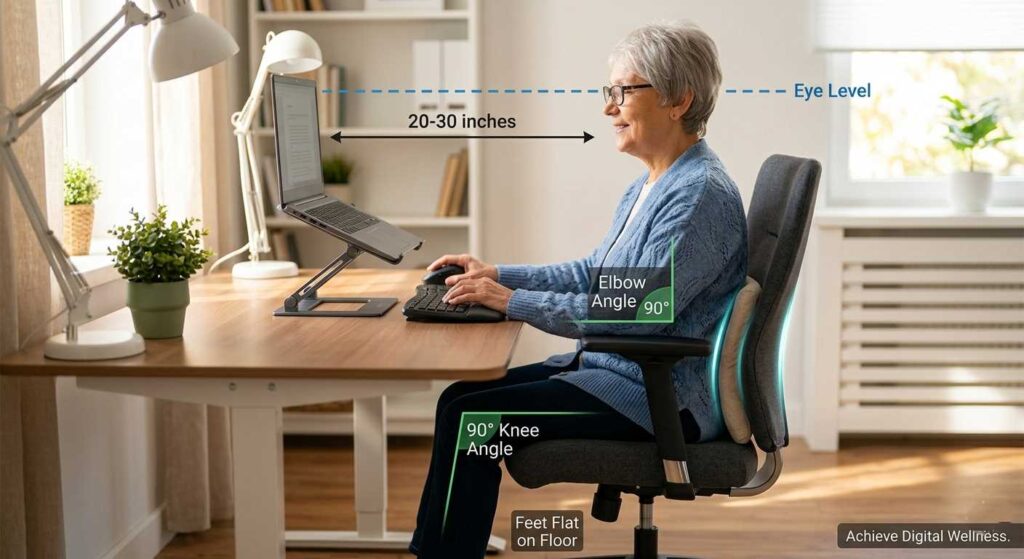
Ergonomic Essentials
- Monitor height: The top third of your screen should be exactly at eye level. This single change prevents “tech neck,” which places up to 60 pounds of pressure on your cervical spine during extended work sessions.
- Chair support: Feet flat on the floor, knees at 90 degrees. Your lower back should be supported by the chair — not by your muscles.
- Mouse: A vertical mouse keeps your forearm in a natural position and prevents the repetitive strain that standard mice cause over time.
- Keyboard: If you type extensively, a split or ergonomic keyboard reduces wrist strain significantly.
For a full home office setup guide including specific product recommendations, see our ergonomic home office setup for seniors and best home office tech for senior consultants.
Vision Protection
Computer Vision Syndrome (CVS) causes headaches, blurred vision, and fatigue — and it’s more pronounced in seniors whose eyes are more sensitive to blue light and screen flicker. The 20-20-20 rule is the most practical solution: every 20 minutes, look at something 20 feet away for 20 seconds. This one habit, done consistently, prevents most of the vision fatigue that derails afternoon productivity.
Managing Your Energy, Not Just Your Time
Most time management advice is designed for 25-year-olds. Senior freelancers typically have a narrower window of peak cognitive energy — usually 2–4 hours in the morning — followed by a natural energy dip. Structure your most demanding work (writing, strategic thinking, client deliverables) into that morning window. Admin, email, and routine tasks belong in the afternoon.
Our work from home schedule guide for seniors covers this energy-based scheduling in detail. For physical wellness habits that directly support cognitive performance, our morning exercises for seniors and anti-inflammatory diet guide are practical starting points.
Tax Essentials for Senior Freelancers
Freelance income is taxed differently than employment income, and the implications are meaningful. As a self-employed freelancer, you’re responsible for both the employee and employer portions of Social Security and Medicare taxes — a combined 15.3% on net self-employment income above $400/year.

The practical upside: you can deduct legitimate business expenses, including your home office, internet, equipment, software subscriptions, and professional development costs. This meaningfully reduces your taxable income. For a complete overview of what senior freelancers need to know going into the 2026 tax year, see our tax tips for senior freelancers.
Note: freelance income can affect Social Security benefits if you’re under full retirement age and earning above the annual earnings limit. For specifics, see our guide to earning income while on Social Security.
Common Mistakes Senior Freelancers Make
And How to Avoid Them
- Trying to Master Everything Before Starting
The learning curve exists, but it’s much shorter than you think. Many seniors spend months reading, researching, and preparing — while earning nothing. The fastest way to learn freelancing is to start with a single skill, submit your first application within 72 hours of creating your profile, and learn by doing.
- Underpricing From the Start
Low rates are not a safe entry strategy — they attract difficult clients, erode your perceived value, and are nearly impossible to raise later with the same client. Start at the market rate for your skill level and let your work speak for itself. One strong review at the right rate is worth more than ten reviews at $10/hour.
- Using a Generalist Profile
As covered in the platform section: specific positioning dramatically outperforms “I can help with anything.” Clients don’t want a generalist — they want someone who has solved their exact problem before.
- Neglecting Cyber Security
Freelancers are prime targets for phishing, payment fraud, and identity theft. Using strong, unique passwords, enabling two-factor authentication, and understanding common scam patterns is essential. Our cyber safety guide for seniors covers the key risks and practical protections.
- Ignoring Digital Organization
Client files, invoices, contracts, and project notes scattered across your desktop and email inbox will eventually cost you a client or a payment. A simple, consistent system — even a basic folder structure and a free tool like Notion or Google Drive — prevents this entirely. Our AI-powered digital organization guide for seniors covers the practical setup.
- Skipping Income Diversification
Relying on a single freelance client or platform creates fragile income. The seniors who build sustainable income combine multiple streams: active freelancing plus passive income elements. Our guides on passive income for seniors, Amazon KDP self-publishing, and affiliate marketing for seniors cover the most practical additions.
Watch: Remote Work After 50
Above, you can watch a quick breakdown of companies actively seeking experienced professionals. If you prefer reading, let’s dive into the most profitable niches below.
Frequently Asked Questions: Freelancing for Seniors
Age and Experience in the Gig Economy
No. Age is a genuine advantage in freelancing — you’re not competing on speed or novelty, you’re competing on judgment, reliability, and domain expertise. Clients specifically seek out experienced professionals for high-stakes consulting, writing, and advisory work. Many of our readers report landing their first client within weeks of starting. See our remote jobs guide for seniors over 70 for specific options at every experience level.
Basic digital literacy is necessary — email, video calls, document sharing, and using a freelance platform. Beyond that, the answer depends entirely on your chosen niche. Consulting, writing, coaching, and virtual assistance do not require technical skills. AI tools like ChatGPT can handle many of the repetitive technical tasks. Our ChatGPT guide for seniors is a practical starting point if you want to build AI fluency quickly.
Timeline and Income Expectations
With a focused profile, most seniors land their first client within 2–4 weeks on platforms like Upwork or Fiverr. Networking through LinkedIn often moves even faster. Generalist profiles tend to wait much longer
Virtual assistance and AI content editing are typically the fastest paths due to high demand and lower barriers. For experts, a single consulting retainer can reach this goal even faster.
Financial and Career Strategy
If you are under full retirement age, earning above the annual limit ($22,320 in 2025) can temporarily reduce benefits. Once you reach full retirement age, you can earn unlimited income without any reduction.
Freelancing offers control over clients and schedules, but you handle your own taxes and acquisition. Part-time employment offers more stability but less flexibility.
Freelancers can use Solo 401(k) or SEP-IRA accounts for higher contributions. If you aren’t “tech-savvy,” starting with core tools like Zoom and Google Docs usually builds confidence within weeks.
Final Thoughts: Your Next Step
Freelancing for seniors in 2026 isn’t about reinventing yourself — it’s about redirecting what you’ve already built. Decades of professional experience, industry relationships, and hard-won judgment don’t disappear when you leave a corporate role. They become your most valuable freelance assets.
The path forward is simpler than most guides make it sound: choose one skill, build one focused profile, apply consistently, and raise your rates as you build reviews. Everything else — better platforms, passive income streams, consulting packages, AI tools — can be added incrementally once the foundation is in place.
If you’re ready to go deeper on the income side, our complete guide to making money online after 50 covers the full picture. For the consulting path specifically, start with transitioning from corporate to consulting. And if you want the senior-specific context for why this moment in particular is well-timed, why 2026 is the ultimate year for a senior gig explains the macroeconomic factors.
Start small. Stay consistent. The income follows.
Last reviewed and updated: April 24, 2026 by the SeniorGig Team.